
What is being compiled, and why on your PC
A shader is a small program the graphics card runs to draw a surface, a light or an effect. A game ships its shaders in a general form, and the graphics driver turns each one into code for your exact card and driver version. That step is the compiling.
DirectX 12 and Vulkan games do much of it while the game runs. If a frame needs a shader that is not built yet, the frame waits for it, and you see a hitch. The result is kept in a shader cache on disk, so next time the game loads it instead of building it again.
That is why this stutter fades: the second time you see the same effect, its shader is already in the cache.
When it shows up
- After a game update. New or changed shaders have to be built once.
- After a graphics driver update. The new driver builds its own code, so every game starts again from an empty cache.
- In a new map, area or effect. The first explosion of a kind can hitch, the second one does not.
- After the cache was cleared. By you, by a cleanup tool, or by Disk Cleanup, which lists the DirectX Shader Cache as something it can delete.
Many games now build most shaders before you play, behind a progress bar at the menu or in the lobby. Warzone and Apex both do some of it that way.
Step 1: let it finish
When a game shows that it is compiling or preloading shaders, wait for it at the menu. Joining a match halfway through just moves the work into your first fights.
Then play a match or two. Stutter that fades over those is this, and it is done. Stutter that comes back every match, in the same places, is something else, or a cache that is not being kept.
If you update the graphics driver the evening before a match that matters, play a warm-up first. Every game you play will compile again.
Step 2: give the cache room
A cache that is too small throws shaders away and builds them again later, which looks like a stutter that never fades.
- NVIDIA: the NVIDIA App, Graphics, Global Settings, Shader Cache Size. NVIDIA's own article gives the driver default as 16 GB and says larger sizes can help with a large game library. Do not set it lower than the default.
- AMD: AMD Software, Gaming, Graphics, Shader Cache. Leave it on. AMD describes the cache as faster loading and less CPU use, because shaders are stored instead of rebuilt each time.
- Disk space: the cache lives on the system drive. A nearly full drive leaves no room for it, nor for the page file and updates.
If you run Disk Cleanup or the Temporary files page in Windows Settings, untick DirectX Shader Cache. Deleting it every few weeks brings this stutter back every few weeks.
Step 3: clear the cache only when it is broken
NVIDIA names three signs of a damaged cache: a game that crashes at launch, lower performance, or visual artifacts. A stutter that comes back every session after you gave the cache room is a fourth. In those cases a clean cache is the fix.
- NVIDIA, in NVIDIA's own order: set Shader Cache Size to Off and restart. Delete the contents of
%LOCALAPPDATA%\NVIDIA\DXCache,%LOCALAPPDATA%\NVIDIA\GLCacheand%LOCALAPPDATA%\NVIDIA Corporation\NV_Cache. Set Shader Cache Size back to Driver Default and restart again. - AMD: AMD Software, Gaming, Graphics, Advanced, Reset Shader Cache.
- Start the game and expect the first session to stutter while the cache fills. If the second and third are smooth, the old cache was the problem.
Do not clear the cache for more FPS. A clean cache has no speed to give, only a stutter to bring back.
Steam's shader pre-caching
Steam has its own setting under Settings, Downloads, Shader Pre-Caching. For Vulkan and OpenGL games it downloads shaders already built for your setup and can process Vulkan shaders in the background. Leave it on.
The background part runs as fossilize_replay.exe, and after a big update it can keep the CPU busy for a long time. If it starts while you play, it competes with the game. Let it finish before you play, or let OakmontGamer hold it while the game runs, described below.
How to tell it apart from other stutter
Shader stutter has a shape. It bunches up at the start of a session and right after a loading screen, and it gets rarer as you play. Other kinds look different on a frame time graph:
- A hitch on a steady rhythm, every few seconds, is a program or a driver: FPS drops every few seconds.
- Hitches when you land or move into a new area, every match, point at video memory and texture streaming.
- Drops in the busiest fights mean the CPU or GPU is at its limit.
The game guides cover each title's own version of this: Fortnite, Apex Legends and Warzone.
What OakmontGamer does about shader stutter
The app does not compile shaders for a game. What it does is keep this stutter from being mistaken for something else, and keep the cache from being thrown away by accident.
- Counts stutters in the first two minutes and in the 30 seconds after a load screen apart, as warm-up. The Timeline marks that stretch.
- In Fortnite, Diagnosis names Shaders compiling when most stutters came right after loading, and says to play a match or two first.
- After a graphics driver update, the Computer page says that every game rebuilds its shaders on the next start.
- In expert mode, Computer, System tweaks lists the shader cache folders with their size. Clearing one asks you to confirm first.
- On a Radeon card it offers to keep the shader cache on for every game, the same switch as in AMD Software.
- In profiles that handle background programs, Steam's
fossilize_replay.exeis paused while a game runs and finishes after it closes.


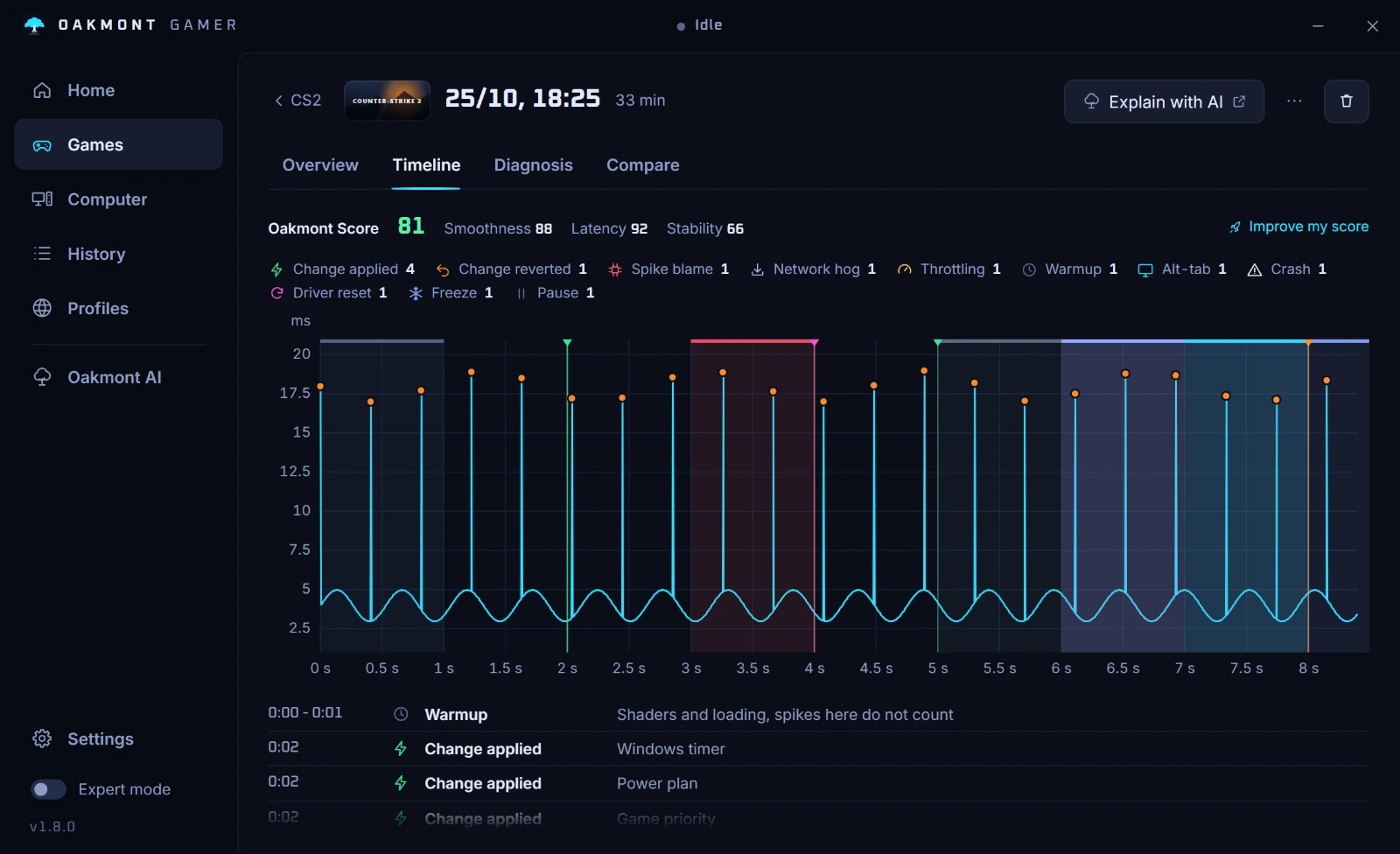
The app also warns when the system drive has less than 15% free, because the shader cache, the page file and updates all need that room.
How the stutter report worksQuestions people ask
- Should I clear my shader cache to get more FPS?
- No. A cleared cache makes every game compile its shaders again, so the next sessions stutter more, not less. Clear it only when it is damaged: crashes at launch, visual artifacts, or stutter that never fades.
- How long does shader compilation stutter last?
- Until the shaders a game uses have been built once. In most games that is the first match or two after an update or a new driver. Games that compile at the menu do most of the work before you play.
- Does a bigger NVIDIA shader cache help?
- It helps when the default is too small for your library. NVIDIA sets the driver default at 16 GB and says larger sizes can help with many games installed. A size below the default throws shaders away.
- Is DX12 stutter the same thing?
- Mostly. DirectX 12 and Vulkan games build more of their shaders while the game runs, so a DX12 game is more likely to hitch the first time it meets a new effect. The fixes are the same.
- Why does the stutter come back after every driver update?
- Because the compiled code belongs to the driver version. A new driver builds its own, so every game starts with an empty cache once.