
Step 1: measure the rhythm
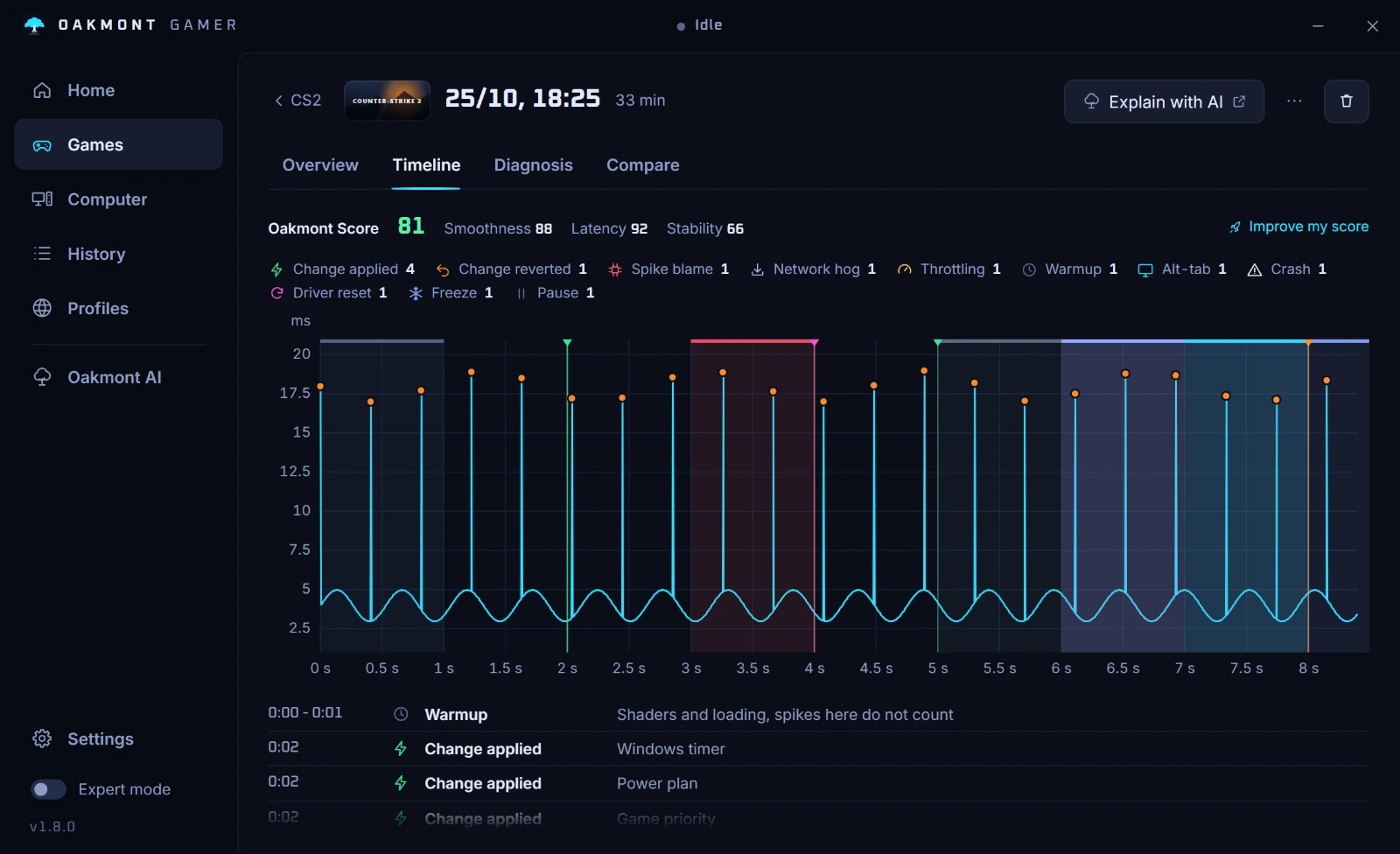
Record ten minutes of play with OakmontGamer and open the session's Timeline. Every stutter is a dot on the frame time line. Look at the spacing.
- Evenly spaced, every few seconds to a minute: something on a timer. A program polling hardware, a scan, a sync. Steps 2 to 4.
- Getting closer together the longer you play: memory filling up or a part heating up. Step 5.
- Only in fights or busy scenes: the PC is at its limit. That is a settings question, not a rhythm.
- Only in the first minutes: shaders and loading. It fades by itself.
Step 2: programs that poll on a timer
The usual suspects are the suites that come with your hardware: RGB lighting, fan control and peripheral software. They wake up every second or so to read sensors or update lights, and some do it in short bursts that land as a frame spike.
OakmontGamer knows a list of them by name: ASUS Armoury Crate and its lighting service, Corsair iCUE, Razer Synapse, SignalRGB, OpenRGB, NZXT CAM, Logitech G HUB and the Nahimic audio service. When one is busy in the seconds of a stutter, Diagnosis names it.
Close it and record again. If you need its lighting, set the colours and quit it before you play.
Step 3: Windows doing its chores
- Search indexing. Under Settings, Privacy & security, Search, the Enhanced mode indexes the whole PC. Microsoft says it may use more system resources. Classic indexes less.
- Updates and Delivery Optimization. Downloads in the background, including uploads to other PCs if you allow it. Game Mode, under Settings, Gaming, stops Windows Update from installing drivers and showing restart notices while you play.
- Background recording. Settings, Gaming, Captures, Record what happened, encodes video the whole time you play. Turn it off unless you use it.
- An antivirus scan. A scheduled full scan reads the whole disk. Move it to a time you do not play.
Step 4: a device or a driver
Some rhythms are not programs at all. A driver that holds the CPU for a millisecond at a time, on a schedule, can give exactly this pattern: a network adapter, a USB device that drops and comes back, an audio driver. Diagnosis names the driver when one held the CPU right before the stutters. DPC latency goes through the drivers one by one.
Unplug what you do not need, one device at a time, and record a session after each.
Step 5: when it gets worse over time
- Memory. When RAM runs out, Windows moves memory to the page file and reads it back from disk. Diagnosis calls it Memory pressure, and Game memory kept growing when the game itself leaks.
- Video memory. When the card's memory is full, textures go to system RAM. Diagnosis calls it Video memory full.
- Heat. A GPU or CPU that reaches its limit lowers its clock, recovers, and lowers it again. Diagnosis calls it GPU too hot, or CPU clocked down.
What background load costs, measured
One measurement of our own, with its conditions. On a Ryzen 7 3800X with an RX 6600 XT and 32 GB of RAM, CS2 on a fixed demo scene, with three 7-Zip jobs compressing in the background: freezing the jobs while the game ran took the average from 96 to 151 FPS and the 1% low from 48 to 91.
With nothing running in the background, the same switch changed nothing: 126.8 against 127.0 FPS. A program has to be busy to cost you frames, which is why the timeline matters more than any list of tweaks.
How OakmontGamer finds the rhythm for you
The app records every frame of a session and, in the same seconds, which programs used the CPU, which drivers held it, how full RAM and video memory were and how hot the parts ran.
- The Timeline shows every stutter against the frame time line, so the spacing is plain to see.
- Diagnosis names the program, driver or device that lined up with the stutters, with its share of them.
- A program on its row can be frozen or put in Eco while the game runs, with one press. The known peripheral suites go into Eco on their own.
- For Rust it also names the steady hitches of the game's garbage collector, with how often they came.


Nothing is injected into the game, and every change for a session is undone when it closes.
How the stutter diagnosis works