
What this page covers
Black Ops 7 is installed and launched through the Call of Duty app on PC, next to Warzone. The Warzone stutter guide already covers shader preloading, streamed textures and video memory, and none of that is repeated here. If the menu is still loading shaders, let it finish: leaving early moves the work into your first match.
What Activision documents for Black Ops 7 on PC:
- DirectX 12 and an SSD are required, with 116 GB free at launch.
- The recommended tier, 60 FPS in most situations with everything on High, lists 8 GB of video memory.
- TPM 2.0 and Secure Boot are required. Step 4.
Step 1: tell slow frames from network lag
Activision's performance page for Black Ops 7 lists stuttering as a symptom of lag: your character seems to freeze and skip ahead. That is the network, and no graphics setting fixes it. A slow frame is different: the whole picture hitches, even when nothing moves on screen.
The test is the frame time line. If it stays flat while players skip around, it is the connection. Activision's advice for that case: play on a wired connection, and keep others on your network from streaming video while you play. Ping spikes and bufferbloat goes further.
Step 2: use the driver Activision recommends
Activision's system requirements page for Black Ops 7 lists a recommended driver version for AMD, NVIDIA and Intel cards, and says to install it if you see graphical issues. The versions change with updates, so read the page itself rather than a number copied into a forum post.
The same page says official Game Ready Driver support for NVIDIA's Maxwell and Pascal cards has ended, and names the last driver for them. That covers the GTX 970 and GTX 1060 from the minimum spec.
After any driver change, the first matches build shaders again. Judge a new driver after that, not on the first match. Shader compilation stutter explains why.
Step 3: deal with third-party apps
Activision's crash page says to shut down applications running in the background, and warns that input remapping software, overlays and recording software can interfere with the game even when they are not running. It gives that advice for crashes; for stutter, close them one at a time and record a match after each. If one of them turns out to be the cause, uninstalling it is Activision's own next step.
One background process you can leave alone. With Black Ops 6 installed, Black Ops 7 preloads the Black Ops 6 executable to cut load times when you switch between them. Activision says it has a very small memory footprint, no impact on performance, and is dismissed when a Black Ops 7 match loads.
Step 4: turn on TPM 2.0 and Secure Boot without new stutter
Black Ops 7 requires both TPM 2.0 and Secure Boot. Activision says players who do not meet the requirements are kept out of some modes and playlists, including Ranked Play, and may be matched with other players who do not meet them either. Call of Duty also needs Windows 10 version 22H2 or later.
If your Ryzen PC uses its firmware TPM (fTPM), check the BIOS date. AMD found that on select Ryzen systems the fTPM can pause the whole PC for a moment, and the fix came in BIOS updates based on AGESA 1207 or newer. That stutter shows up outside games too, in the mouse and in sound, which is how to recognise it.
Ricochet, the game's anti-cheat, uses a kernel-level driver. Activision says it only runs while you play a Ricochet game and shuts down when you exit. Battlefield 6 has the same TPM and Secure Boot rules, with EA's own steps for checking them.
Step 5: measure with the benchmark tool
Black Ops 7 has a built-in PC Benchmark Tool. A live match changes too much from one run to the next to judge a setting by. Run the benchmark with OakmontGamer recording, change one thing, run it again and compare the 1% lows.
Run each setup three times and alternate: with the change, without it, with it again. If three runs of the same setup spread wider than the change moves the 1% low, the change has shown nothing. How to read 1% lows. For Battlefield 6, see Battlefield 6 stutter.
What OakmontGamer does for Black Ops 7
The app finds Call of Duty by cod.exe and records it like any other game. It has no in-game preset for Call of Duty, so it does not touch the game's settings files.
- Counts stutters after warm-up and loading, so shaders built after an update do not count against your PC.
- Tells network lag from stutter: steady frames while ping or packet loss jumps is Network lag in Diagnosis, and when a program was downloading at that moment, the Timeline names it.
- Names a background program busy in the seconds of a stutter, and freezes it or puts it in Eco while the game runs. Ricochet's own processes are never touched.
- Names Video memory full when the card was over 95% full during the stutters, and with the VRAM guard on, freezes browsers holding video memory until it is back under 85%.
- The Computer page flags a Ryzen firmware TPM with a BIOS older than AGESA 1.2.0.7.
- Call of Duty counts as a competitive shooter, so on a Radeon AFMF, Chill and Enhanced Sync stay off for it.


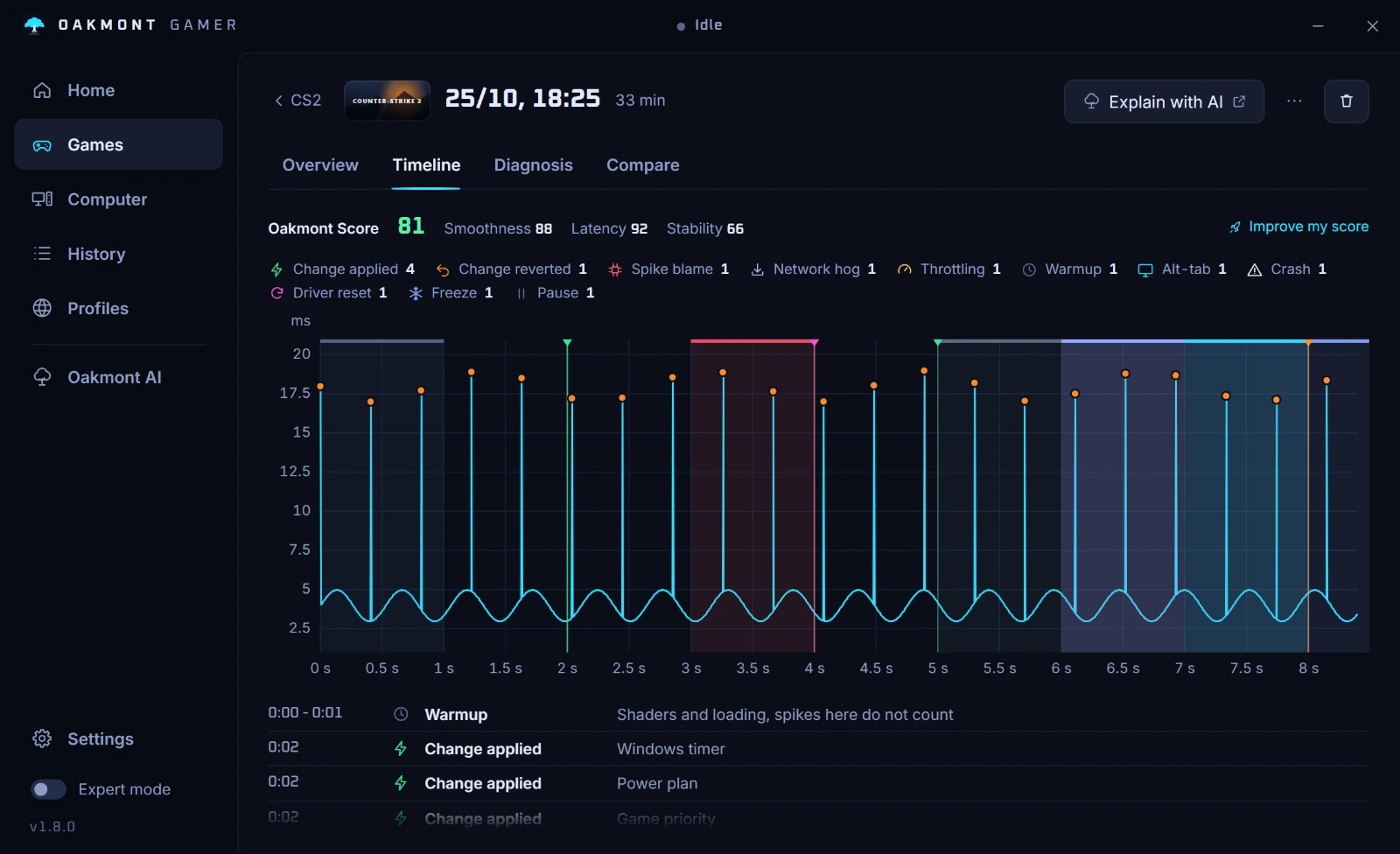
Everything the app changes for a session is undone when the game closes. How the stutter report reads a session.
How the stutter diagnosis worksQuestions people ask
- Why does Black Ops 7 stutter when my FPS is high?
- FPS is an average and hides single slow frames, so look at the 1% low and the frame time line. If the frames are even and the game still skips, it is what Activision calls lag: the network, not the PC.
- Does Black Ops 7 need TPM 2.0 and Secure Boot?
- Yes, both are required on PC. Activision says players without them are kept out of some modes, including Ranked Play, and may be matched only with others who do not meet the requirements.
- Which graphics driver should I use for Black Ops 7?
- The one Activision lists on the Black Ops 7 system requirements page. It names a recommended version for AMD, NVIDIA and Intel and says to install it if you have graphical issues.
- Does Black Ops 6 in the background slow down Black Ops 7?
- Activision says no. With Black Ops 6 installed, its executable preloads to cut load times, uses very little memory and is dismissed when a Black Ops 7 match loads.
- Is Black Ops 7 stutter the same as Warzone stutter?
- Partly. Shader preloading, streamed textures and video memory are covered in the Warzone guide; this page covers what Activision documents for Black Ops 7 itself.
Sources
The technical claims on this page were checked against these official pages.
- Activision: Improving lag and in-game performance in Black Ops 7
- Activision: PC system requirements for Black Ops 7
- Activision: Crashes or game freezes in Black Ops 7
- Activision: Black Ops 7 installation and setup
- Activision: TPM 2.0 and Secure Boot for Call of Duty
- Activision: RICOCHET Anti-Cheat overview
- Call of Duty: Black Ops 7 PC specs, preloading and features
- AMD: Intermittent system stutter with fTPM enabled on Windows 10 and 11