
First, find out which stutter you have
- In the first minutes after a game update or a new graphics driver: shaders being built for your card. It fades by itself: shader compilation stutter.
- In big fights, with smoke and explosions: the card or the CPU at its limit. Step 3.
- On a steady rhythm, even in quiet moments: a driver or a program. Steps 4 and 5, and FPS drops every few seconds.
- Players snapping back while your frames stay even: the connection, not the PC. EA calls this rubberbanding and puts it down to high latency or a spiky connection.
Record a few matches with OakmontGamer before you change anything. The FPS counter hides single long frames; the 1% low and the frame time line show them. What 1% low FPS means has the details.
Step 1: meet the security rules without new stutter
EA lists TPM 2.0 and Secure Boot as required for Battlefield 6 on PC. EA's help page says Secure Boot supports EA Javelin anticheat, and trying to play without it brings up a prompt instead of the game.
To check, press Win + R, run msinfo32 and open System Summary. BIOS Mode should say UEFI and Secure Boot State should say On. tpm.msc shows whether the TPM is ready. Read EA's guide before you touch the BIOS: Secure Boot needs the Windows disk in GPT, not MBR, and EA warns that wrong BIOS settings can stop a PC from starting.
If your Ryzen PC uses its firmware TPM (fTPM), check the BIOS date. AMD found that on select Ryzen systems the fTPM can pause the whole PC for a moment, and the fix came in BIOS updates based on AGESA 1207 or newer. If the PC started to hitch everywhere after you turned the TPM on for this game, update the BIOS.
EA's spec list also says HVCI capable and VBS capable, which is about what the PC supports. Whether Memory integrity costs you frames is its own question: VBS and Memory integrity for gaming. What Memory integrity costs and when to keep it is in VBS and Memory integrity.
Step 2: Windows, the driver and HAGS
EA's minimum spec says enabling Hardware Accelerated GPU Scheduling is recommended. It is in Windows Settings, System, Display, Graphics, and needs a restart. HAGS on or off explains what it changes.
EA also advises the latest graphics driver before you launch the game. Its graphics troubleshooting page adds three things: install the Windows updates, do a clean install of the driver so the old one cannot clash with the new, and set any overclock back to stock while you test.
On microstutter, the same page says it can come from a driver that does not work well with a new game yet, and that then you may have to wait for a newer driver. If the stutter started with a driver update, that is the suspect.
Step 3: lower what EA says to lower first
EA's settings guide names the settings to put on Low first, because you notice them least, and two display settings to check:
| Setting | EA's advice |
|---|---|
| Undergrowth Quality | Low |
| Effects Quality | Low |
| Volumetric Quality | Low |
| Lighting Quality | Low |
| Local Light & Shadow Quality | Low |
| Sun Shadow Quality | Low |
| Post Process Quality | Low |
| Vertical Sync | Off, to avoid lag |
| Fullscreen Resolution and Refresh Rate | Match your PC's settings |
If that is not enough, EA's next step is everything on Low. Its own spec notes point the same way: for 144 FPS at 1440p, EA moved the recommended preset from High to Medium to keep frame rates consistent.
Change one thing at a time and compare the 1% low of two recordings, not the FPS counter.
Step 4: run the memory in dual channel at its rated speed
Every spec tier EA lists asks for dual channel RAM, from 16 GB at 2133 MHz at the minimum to 32 GB at 4800 MHz for Ultra. One stick runs in single channel with half the bandwidth, and many PCs run RAM below its rated speed until XMP or EXPO is turned on in the BIOS. A big shooter waiting on the CPU shows both as low 1% lows. XMP and EXPO for gaming covers how to check.
With 16 GB, close the browser and launchers before you play. When RAM runs out, Windows reads memory back from disk and each burst of that is a hitch. The app's Computer page checks the RAM speed and channels for you.
Step 5: background programs and overlays
EA's troubleshooting page says that too many background apps running at the same time can cause graphics problems. Overlays, monitoring tools and recording software hook into the game or poll the hardware, and both cost frame time. Close them one at a time and record a match after each.
One exception: if you play on Steam, EA says the Steam overlay has to be on when you start Battlefield 6 so your account can be verified. You can turn it off after that. Other big shooters on PC: Black Ops 7 and Warzone.
What OakmontGamer does for Battlefield 6
The app records Battlefield 6 like any other game, from outside, with nothing injected. It has no in-game preset for Battlefield, so it does not touch the game's settings files.
- Counts stutters from warm-up and loading apart, the first two minutes and 30 seconds after a load screen, so shaders built after an update are not blamed on your PC.
- Diagnosis names the cause of each stutter: a driver holding the CPU, a background program, Memory pressure, Video memory full or Network lag, each with a fix on the same row.
- The Computer page flags a Ryzen firmware TPM with a BIOS older than AGESA 1.2.0.7, RAM below its rated speed, a single RAM stick and active virtualization-based security, and gives HAGS a verdict for your card.
- EA's anti-cheat process is never touched, and while a kernel anti-cheat runs the app skips its per-thread tuning of the game.
- Battlefield counts as a competitive shooter, so on a Radeon AFMF, Chill and Enhanced Sync stay off for it.


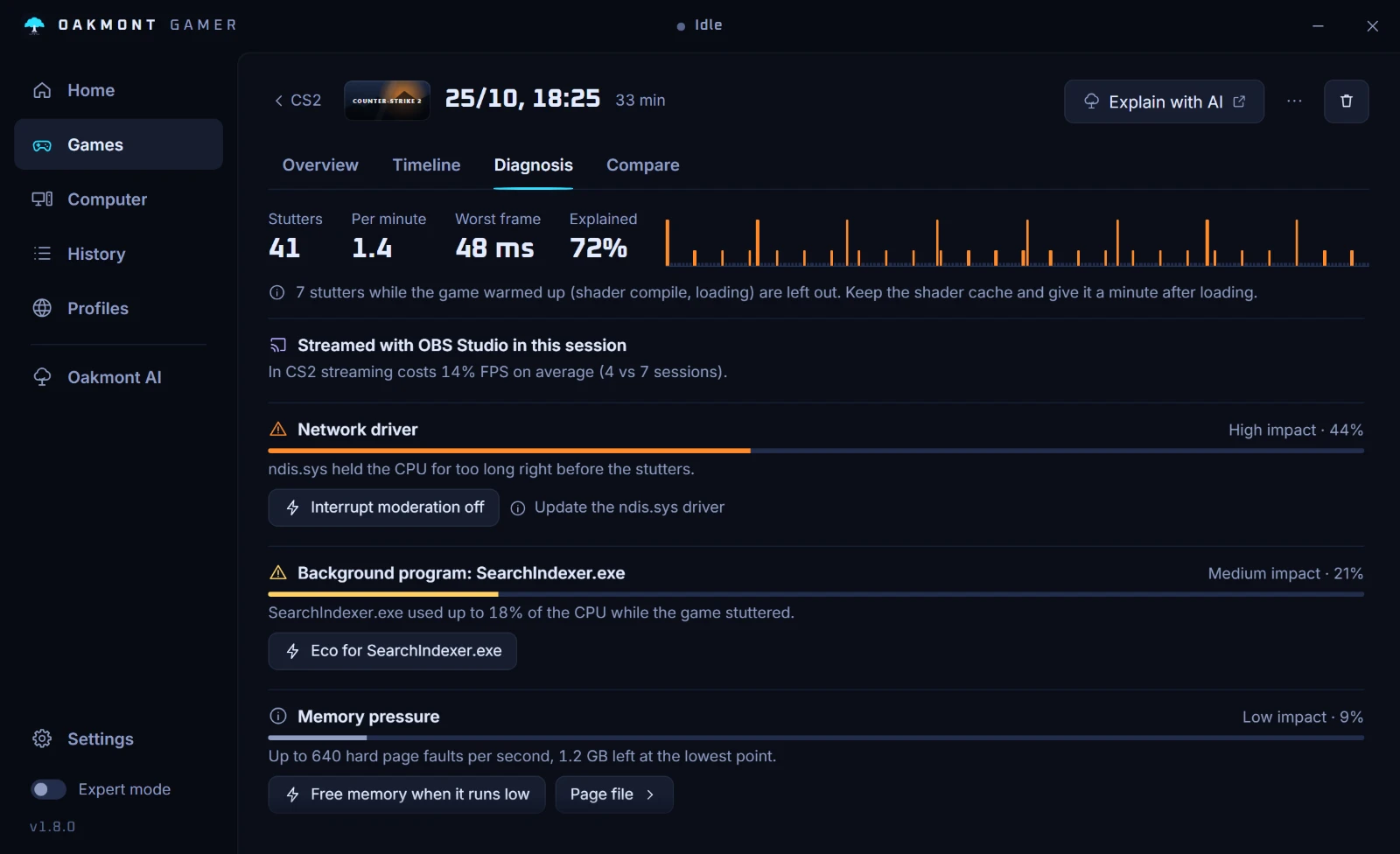
Everything the app changes for a session is undone when the game closes.
How the stutter diagnosis worksQuestions people ask
- Why does Battlefield 6 need Secure Boot?
- EA says Secure Boot supports EA Javelin anticheat, which helps detect and remove cheaters. It is required on PC: without it the game shows a prompt instead of letting you play.
- Why does Battlefield 6 stutter after an update?
- A game update or a new graphics driver means shaders get built again for your card, and the first minutes hitch while that happens. It fades within a match or two, and clearing the shader cache only brings it back.
- Which graphics settings does EA say to lower in Battlefield 6?
- Undergrowth, Effects, Volumetric, Lighting, Local Light & Shadow, Sun Shadow and Post Process Quality, all to Low first. If that is not enough, EA suggests everything on Low.
- Should I turn on HAGS for Battlefield 6?
- EA's minimum spec recommends Hardware Accelerated GPU Scheduling. Turn it on, restart, and compare the 1% low of a recording before and after.
- Is rubberbanding in Battlefield 6 a PC problem?
- No. EA describes rubberbanding as a connection issue, such as high latency or a spiky connection. If your frame times stay even while players snap back, look at the network: ping spikes and bufferbloat.
Sources
The technical claims on this page were checked against these official pages.
- EA Help: How do I use Secure Boot on my PC?
- EA: Get Ready for Battlefield 6, Secure Boot and PC specs
- EA Help: PC and controller settings in Battlefield 6
- EA Help: How to troubleshoot graphics issues on PC
- EA Help: Battlefield 6 account linking and access guide
- AMD: Intermittent system stutter with fTPM enabled on Windows 10 and 11