
What a DPC is
When a device needs attention, such as a network packet arriving or a sound buffer emptying, its driver runs an interrupt routine (ISR). Microsoft asks for these to be very short, so the longer work is queued as a deferred procedure call (DPC) and runs right after, ahead of normal programs.
Nothing else on that CPU core runs during a DPC, the game included. Microsoft's driver guidance is that a typical DPC should run no longer than 100 microseconds, and an ISR no longer than 25. A driver that takes a millisecond or more holds the game long enough to push a frame out late, and audio can crackle at the same moment.
The signs
- Stutter that no graphics setting changes and that comes at any frame rate.
- Crackling or popping audio, sometimes at the same moment as the stutter.
- A mouse that skips now and then.
- Worse when a particular device is busy: downloading on Wi-Fi, a USB headset, an external drive.
Step 1: find the driver
Three tools can name it. They measure the same thing, so use the one that answers your question.
- OakmontGamer traces driver calls while you play and lines them up with your stutters. The session's Diagnosis tab names the driver behind them, and Technical details, Drivers (DPC / ISR) lists every driver with its longest call. It needs to run as administrator for the kernel trace.
- LatencyMon from Resplendence measures ISR and DPC times and hard page faults on an idle or busy PC and names the worst driver. It does not know when your game stuttered.
- Windows Performance Recorder and Analyzer from Microsoft are the official tools. The DPC/ISR graph shows every call by module, and it takes some learning.
Step 2: read the driver's name
| Driver | What it is | First thing to try |
|---|---|---|
ndis.sys, tcpip.sys, your adapter's driver | Network | Update the adapter driver, then see Step 3. |
nvlddmkm.sys | NVIDIA graphics | Update the driver; if it started after an update, roll back one version. |
amdkmdag.sys, atikmdag.sys | AMD graphics | Update the driver, or roll back one version. |
storport.sys, stornvme.sys | Storage | Update the chipset and storage drivers; check what reads the disk while you play. |
usbxhci.sys, usbhub3.sys | USB | Unplug devices you do not need; lower a very high mouse polling rate. |
portcls.sys, HDAudBus.sys | Audio | Set the device to 48 kHz and turn off audio enhancements. |
ACPI.sys | Power and firmware | Update the BIOS; try the High performance power plan. |
wdf01000.sys is a framework many drivers are built on, so it says little by itself. Look at which device was busy at the same time.
Step 3: network adapters
Network drivers are the most common DPC source in games, because a match keeps the adapter busy the whole time. Two adapter settings matter, both in Device Manager, the adapter's Properties, Advanced.
- Interrupt Moderation. It batches interrupts to save CPU time. Microsoft's tuning guide says to turn it off for the lowest latency, at the cost of more CPU use. Test it both ways.
- Power saving options of the adapter. Their names vary by vendor; turning them off keeps the adapter from waking up slowly.
One common tip is wrong for Intel Wi-Fi: Intel says the "Allow the computer to turn off this device to save power" checkbox only acts on sleep and hibernate, has no effect on Wi-Fi power management, and should stay checked.
Step 4: check that it worked
Play the same scene after each change and compare the sessions: the driver's longest call, the number of stutters and the 1% low. How to measure 1% lows shows how to tell a real change from noise. Change one thing at a time, or you will not know which one fixed it.
What OakmontGamer does about DPC latency
Every session runs a kernel trace of driver calls next to the frame capture. After the match the Diagnosis tab grades what it found.
- A longest DPC over 500 microseconds is flagged, over 1,000 marked bad. For an ISR the lines are 250 and 500.
- When most driver calls are long, not just one spike, it says so and names the driver whose typical call is longest.
- A driver is blamed for stutters only when one of its calls took a millisecond or more right before them.
- The fix sits on the same row: for a network driver, a button that turns interrupt moderation off, and the adapter's power saving.


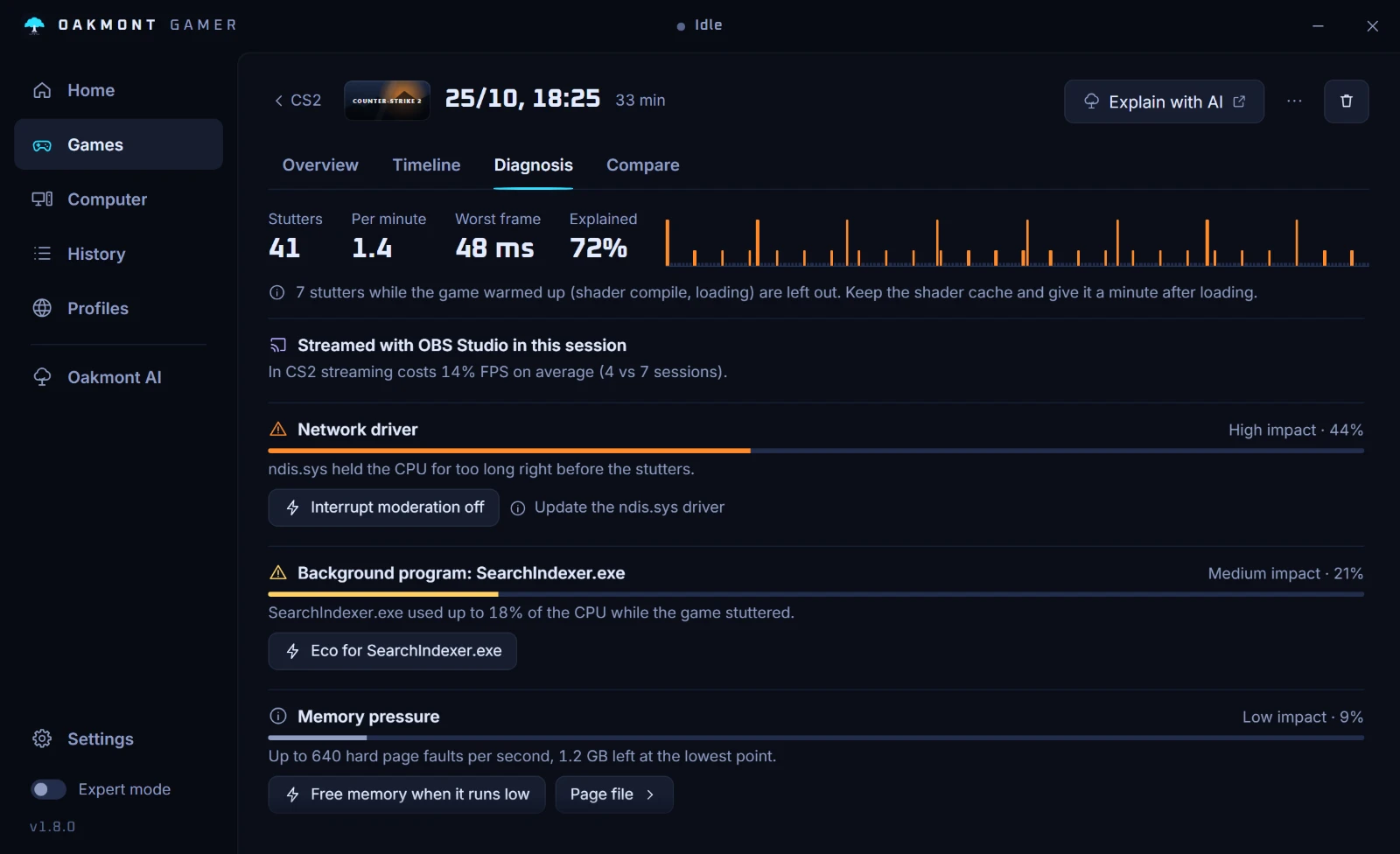
The app cannot update a driver for you. It tells you which one and keeps the sessions, so you can see whether the update helped.
How the stutter diagnosis works