
Why 300 FPS can still stutter
FPS is an average over a second. At 300 FPS a frame takes about 3.3 ms. If one frame in that second takes 30 ms, the counter still shows around 290 and you saw a hitch. So stop reading FPS and read frame time: how long each single frame took.
Two readings describe it well. The 1% low is the speed of your slowest 1% of frames, and it drops when stutter gets worse even if the average stays put. The frame time graph shows each stutter as a spike. What 1% low and 0.1% low mean has the details.
Stutter in the first couple of minutes of a match, or right after a map loads, is mostly shaders compiling and assets loading. It goes away by itself. Do not clear the shader cache to fix it: that brings it back.
Step 1: record a match with OakmontGamer
OakmontGamer records every frame of a game from outside it, with nothing injected. There is nothing to start by hand: open the app, launch CS2 and play.
- Play ten minutes of the same thing you normally play. A deathmatch server is repeatable enough.
- Close the game and open the session: Games, CS2, Sessions. The Overview tab shows average FPS, 1% low, 0.1% low and the number of stutters.
- Open the Timeline tab. Every stutter is a dot on the frame time line. Note when they happen: evenly spread, in fights, after an alt-tab, only in the first minutes.
- The session stays in the list. Every later step is compared against it in the Compare tab.
A stutter here is a frame at least three times the usual length and at least 12 ms longer: one you feel. Shorter hitches are counted apart as micro-stutters.
Step 2: check for a driver holding the CPU
Drivers run short routines (DPCs and interrupts) that nothing else can interrupt. When one runs too long, the game waits and a frame comes out late. No graphics setting fixes that kind of stutter.
- Open the session's Diagnosis tab. A driver that held the CPU right before the stutters is listed as a cause, with its share of them. Only a call of a millisecond or more is blamed.
- For the whole list, open Technical details at the bottom of the tab. Drivers (DPC / ISR) shows every driver with its longest call in the session.
- The driver's name says where to look:
ndis.sysandtcpip.sysare the network stack,nvlddmkm.sysis the NVIDIA graphics driver,storport.sysis storage,usbxhci.sysis USB.
What to do depends on which one it is. Network: update the driver, then turn off interrupt moderation and the power saving options of the adapter; for interrupt moderation the Diagnosis row has a button. USB: unplug devices you do not need, or lower a very high polling rate. Audio: set the device to 48 kHz and turn off enhancements. Graphics: update the driver.
Step 3: look for a program taking the CPU
The same Diagnosis tab names a program that was busy in the seconds of the stutters: Background program, with the name of its exe. The usual suspects are search indexing, updaters, a browser playing video, RGB and peripheral software, and recording tools.
Close it and record another match. If it is something you need, use the fix on its row: the app puts it in Eco or freezes it while the game runs. Then set the two sessions side by side in the Compare tab.
Step 4: rule out memory pressure
When RAM runs out, Windows moves memory to the page file and reads it back from disk when the game asks for it. Each read is a hard page fault, and a burst of them is a hitch.
Diagnosis lists this as Memory pressure when hard page faults or nearly full RAM lined up with the stutters. No such row means memory was fine in that session.
If it is there, close the browser and launchers before you play, and open Computer, Page file in the app: it should be one page file on a fast drive, not a small fixed one.
Step 5: tell network lag from stutter
Rubber-banding, players teleporting and shots that register late feel like stutter and are not. The test is simple: during the hitch the frame time line on the Timeline stays flat while ping or packet loss jumps. Diagnosis lists it as Network lag, and when a program was downloading or uploading at that moment, the Timeline names it.
If that is your case, the frames are innocent and the connection is the problem. Ping spikes and bufferbloat covers it.
If nothing lines up: the CPU limit
CS2 leans on the CPU. When the stutters match no driver, no program and no memory pressure, the game is often just waiting on the CPU, and Diagnosis says so: CPU at its limit. Lowering graphics will not change much then, because the GPU was not the limit. What helps is less competition for the CPU: fewer programs in the background and a clean set of launch options.
Two more patterns are worth knowing. Long frames that are exactly twice the normal length are VSync missing its slot: turn VSync off and cap FPS instead. And a game drawn through the desktop compositor gets its frames late: see fullscreen optimizations.
What OakmontGamer watches while you play
All five steps read one recording. While you play, the app captures every frame, and in the same seconds it watches driver calls, background programs, memory and ping. After the match the session's Diagnosis tab puts it together.
- Counts the stutters and leaves out the ones from shader warm-up and loading: the first 2 minutes, and 30 seconds after a load screen.
- Flags memory pressure, network lag, a GPU that ran hot, VSync misses and a game drawn through the compositor.
- Says when CS2 mostly waited on the CPU, so you do not lower graphics for nothing.


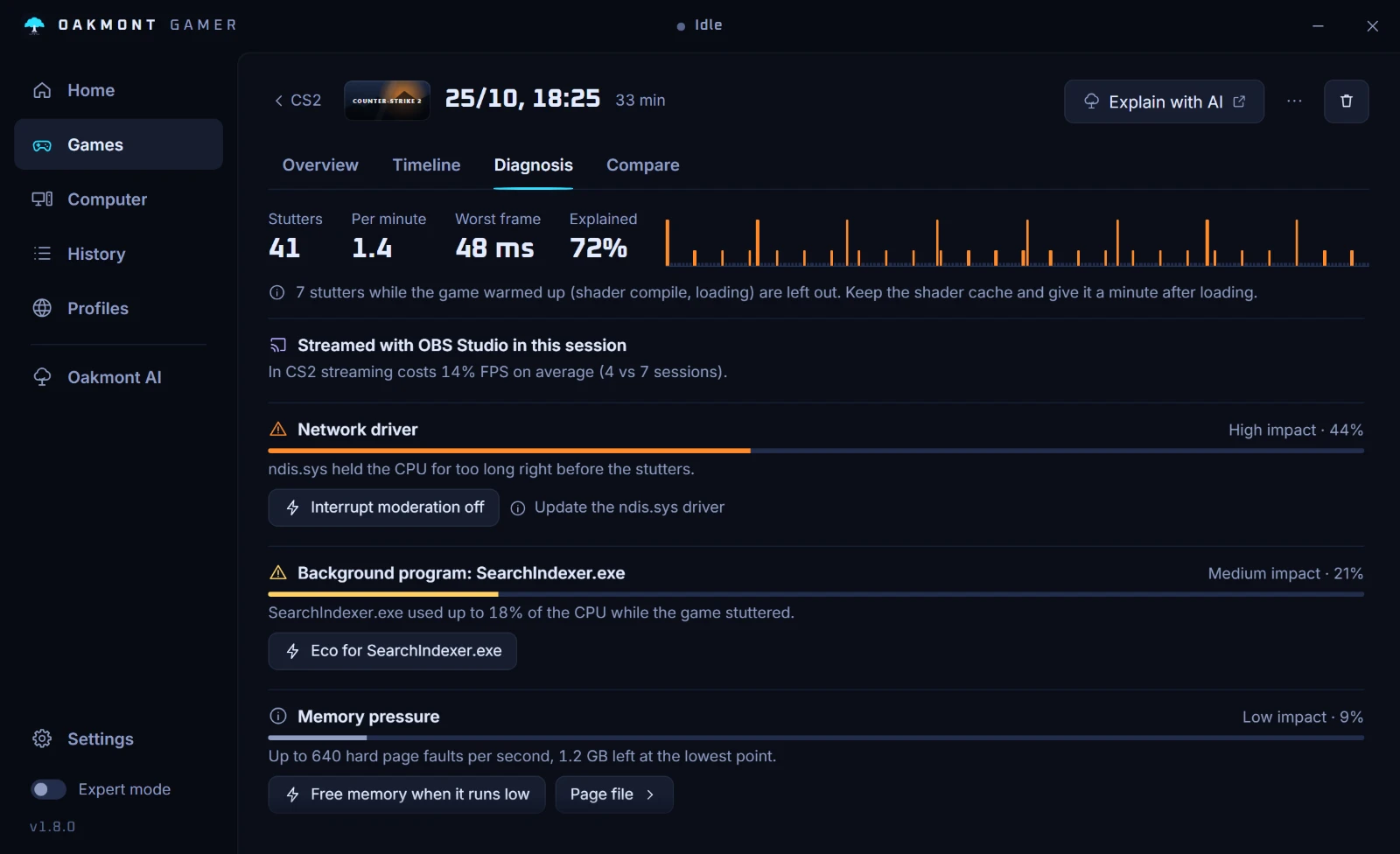
Each cause comes with a fix on the same row. Nothing is injected into the game, and every change the app makes is undone when the game closes. It does not explain everything: a stutter that lines up with nothing is usually the game itself, and the app says so.
How the stutter diagnosis works