
What Razer Cortex does, by Razer's pages
Razer describes Cortex as a suite of gaming optimization tools for Windows 10 and 11, 64-bit. Its Game Booster page says the booster starts by itself the moment you launch a game, stops non-essential processes and apps such as business apps and background helpers, and offers two CPU core modes: one that disables CPU sleep mode and one that lets the core prioritize gaming. When you finish, it restores the PC to its previous state. It also has an in-game FPS counter, and Razer says it does not touch hardware settings or overclock.
Booster Prime goes into the game itself. For supported games, which include Cyberpunk 2077, Fortnite, PUBG, Valorant, Apex Legends, League of Legends and Call of Duty: Modern Warfare, it sets the graphics options to one of four modes or to an FPS target you pick, and a Revert button puts the original settings back.
Around that sit tools that have nothing to do with frame rate: a System Booster that deletes junk files, Game Clips that save the last 30 seconds, a price comparison across game stores, and loyalty points you can redeem for rewards. All of this is from razer.com/cortex and the pages it links, read on November 15, 2026. The pages we read show a download button and no price.
Where Cortex is the better pick
- You want the extras. Clips of the last 30 seconds, game deals and reward points are part of Cortex. OakmontGamer has none of them.
- You want one switch and no numbers. Cortex turns on by itself and asks nothing. OakmontGamer shows measurements after every session, which some players never want to read.
- You do not want to pay. Razer's pages show no price. OakmontGamer runs in full for 5 days and then needs a one-time licence.
What a booster's page cannot tell you
Razer says Game Booster increases FPS. Its pages do not say by how much, on which hardware or in which games, and no booster can promise that honestly, because the answer differs from PC to PC. Closing background helpers frees almost nothing on a PC that has few of them. Keeping the CPU out of sleep states can help a game that waits on the CPU and does nothing for one that waits on the graphics card.
So the useful question about any booster, Cortex or ours, is not whether it can raise FPS. It is whether it raised yours, in your game, by more than the difference between two runs of the same setup. That takes a measurement with the booster and without it. Do game boosters work at all?
Side by side
| Razer Cortex | OakmontGamer | |
|---|---|---|
| Starts | When you launch a game | When a game is in front, from that game's profile |
| Changes | Stops non-essential apps; two CPU core modes | Power plan, timer, services, priority, cores and background apps |
| Afterwards | Restores the PC to its previous state | Undoes every change from a journal, after a crash too |
| Game settings | Booster Prime, in supported games, with Revert | Presets for 41 games, the old file backed up |
| Proof | No measured figures on its pages | Each change tested against stock Windows, kept only if it wins |
| Stutter | An FPS counter | Every spike matched to the driver behind it |
| Extras | Clips, game deals, reward points, junk cleaner | Network test, driver check, change history |
| Price | No price on the pages we read | 5 days in full, then one payment |
Test whichever one you install
- Pick one scene you can repeat: a benchmark, a demo, or standing in the same spot for two minutes.
- Play it three times with the booster off and three times with it on, in turns.
- Compare the 1% lows, not the average FPS. How to read 1% lows.
- If the gap is smaller than the spread between runs of the same setup, the booster did nothing for this game. Turn it off for that game.
Run one booster at a time. Two programs changing the same priority or power plan undo each other, and the numbers tell you nothing.
What OakmontGamer does instead
OakmontGamer is built around that test. It changes Windows only while a game runs, and its Tuning plays each change against stock Windows on your PC.
- On a game with a benchmark or a demo, such as CS2, Dota 2, Cyberpunk 2077 and Hitman, the game starts by itself and plays the same scene with the change and without it. A game without one is tested across your sessions or with a short spot test.
- A change stays only when the 1% low improves by more than the noise between runs, and the result goes into that game's profile. The rest are reverted.
- Every change is written to a journal before it is made, and undone on exit, logoff, shutdown or after a crash.
- Nothing is injected into a running game, so anti-cheat has nothing to object to. The HUD is a window of its own.


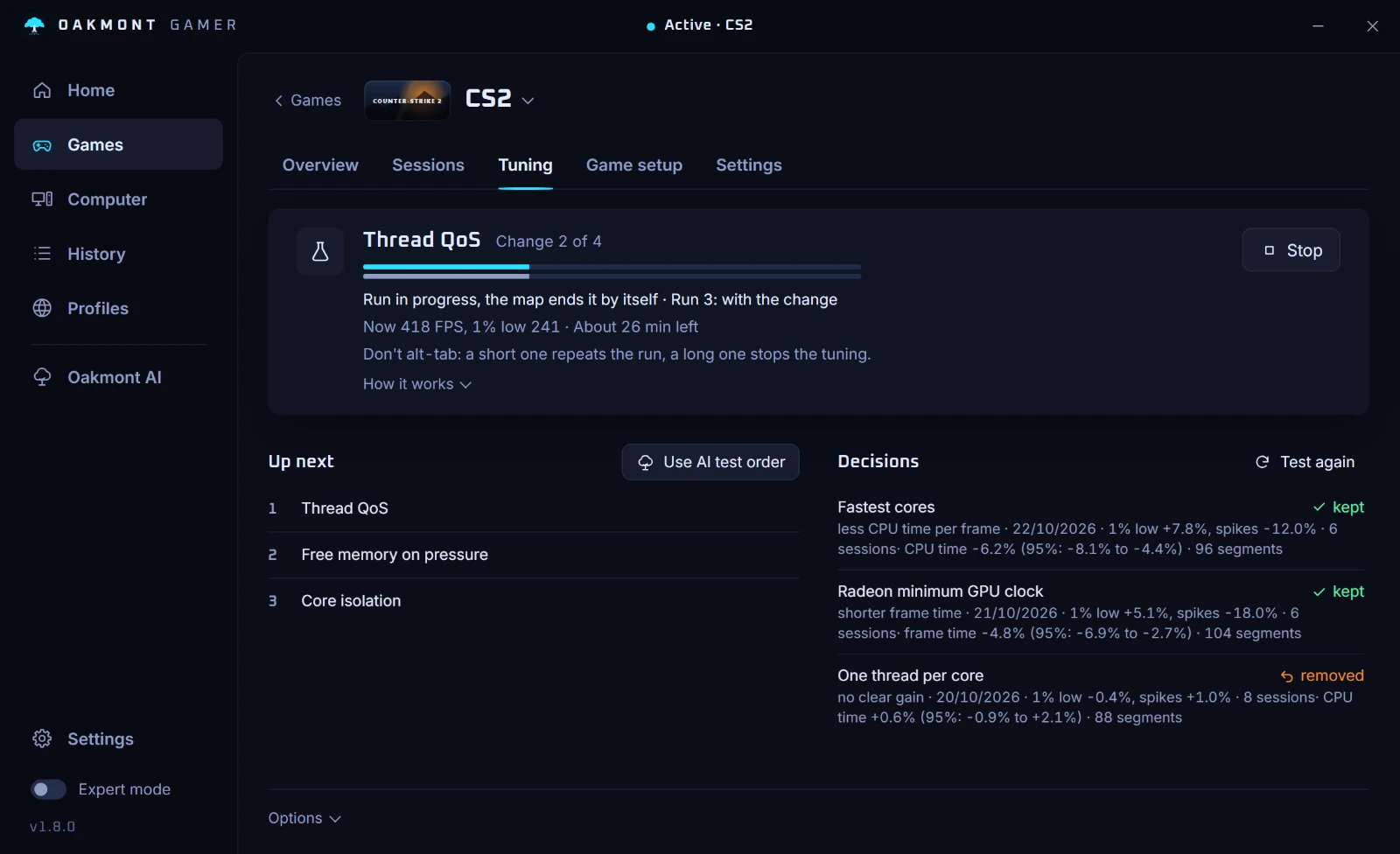
It does not promise a number of FPS. On a PC that is already well set up, few changes win, and the app says so. A new install runs in full for 5 days, then a one-time licence keeps tuning on, for up to 3 PCs.
How a change has to win to stayQuestions people ask
- Is there a good alternative to Razer Cortex?
- Windows Game Mode, which is on by default, covers the basics. If you want a booster, pick one that shows what it changed and lets you measure it. OakmontGamer tests each change on your PC and keeps only what raises your 1% lows.
- Does Razer Cortex increase FPS?
- Razer says it does, by stopping non-essential apps and managing Windows, but its pages give no measured figures. Whether it helps your game is something only a test with it on and off can show.
- Does Razer Cortex put my settings back?
- Razer's Game Booster page says it restores the PC to its previous state when you finish playing, and Booster Prime has a Revert button for game settings.
- Can I run Razer Cortex and OakmontGamer together?
- It is better not to. Both change process priority and power settings while a game runs, so each would undo the other and your measurements would mean nothing. Use one at a time.
- Is OakmontGamer a subscription?
- No. Every feature works for 5 days after you install it. After that one payment keeps tuning on, updates included, on up to 3 PCs. The price is next to the buy button.