
What Process Lasso does
Process Lasso is a Windows process manager from Bitsum. On its home page, read on November 15, 2026, Bitsum lists ProBalance, which helps keep the system responsive during high CPU loads; Performance Mode, which switches to the Bitsum Highest Performance power plan while demanding apps run; permanent CPU affinities and priorities, applied every time a process launches; and IdleSaver, which uses a faster power plan while you use the PC and a power-saving one when it is idle.
It is free to use, and Pro is sold as a lifetime, yearly or monthly licence, for one PC or a whole home, on Bitsum's purchase page. The download lists Windows 7 to 11 and Windows Server. The home page does not claim higher frame rates. It is a tool for controlling how Windows schedules programs, and a game is one program among many.
What a game booster does
A game booster waits for a game to start, then changes Windows for the length of the session: a faster power plan, a higher priority for the game, background programs paused or closed, some services stopped. When the game closes it should put all of it back. The changes are the same kind Process Lasso makes. The difference is that a booster ties them to one game and one session, and leaves the desktop alone the rest of the time.
Side by side
| Process Lasso | OakmontGamer | |
|---|---|---|
| Acts on | Any program, by your rules | The game in front, from its profile |
| When | All the time, at every launch | Only while the game runs |
| Priority and cores | Permanent rules per program | Per game, per session |
| Power plan | Performance Mode and IdleSaver | Switched for the session, put back after |
| A busy PC | ProBalance | Background apps frozen or slowed by your rules |
| Measures the game | Not its job | FPS, 1% lows, spikes and the driver behind each |
| Proof | You judge the effect | Each change tested against stock Windows |
| Price | Free, Pro paid | 5 days in full, then one payment |
When Process Lasso is the better tool
- The whole PC is sluggish under load, not only games. ProBalance works on every program, and a booster does nothing outside a game.
- You render, compile or encode for hours and want fixed cores for a program that is not a game. Lasso's rules hold for anything.
- You want control, not decisions. Lasso does exactly what you set and nothing more.
- You run an older Windows. Lasso lists Windows 7 onwards. OakmontGamer needs Windows 10 version 2004 or newer, or Windows 11.
Running both
They can live on one PC, but not with both steering the same game. If Lasso has a permanent priority or affinity rule for a game's exe and a booster changes it at launch, one overrides the other, and any before and after numbers mean nothing.
The simple split: let Process Lasso own your other programs, and let the booster own the game. Remove the game's exe from Lasso's rules, or leave the booster's priority and core changes off for that game. Performance Mode and a booster's power plan clash the same way, so pick one of them.
Measure the rule you set
- Pick a scene you can repeat: a built-in benchmark, a demo, or one spot in the game.
- Run it three times without the rule and three times with it, in turns.
- Compare 1% lows, not average FPS. What 1% lows show.
- Keep the rule only if the gap is bigger than the spread between runs of the same setup.
That goes for a priority rule in Lasso as much as for anything a booster does. A game raised to High or Realtime priority can starve the threads that play your sound and read your mouse, and cause the stutter it was meant to fix. Why frames drop every few seconds.
What OakmontGamer does with priority and cores
OakmontGamer works like a booster that tests its own rules. When a game starts it applies that game's profile: power plan, timer, priority, core affinity, paused services and frozen background apps. When the game closes, all of it is undone.
- Priority and cores are candidates, not defaults. Tuning plays each one against stock Windows and keeps it only when the 1% low wins by more than the noise.
- On hybrid Intel and X3D chips it can test the fastest cores or the cache cores for the game, and keep the result per game.
- Sync clients are never frozen, and critical Windows services are never stopped.
- Every change is journaled first and undone on exit, logoff, shutdown or after a crash.


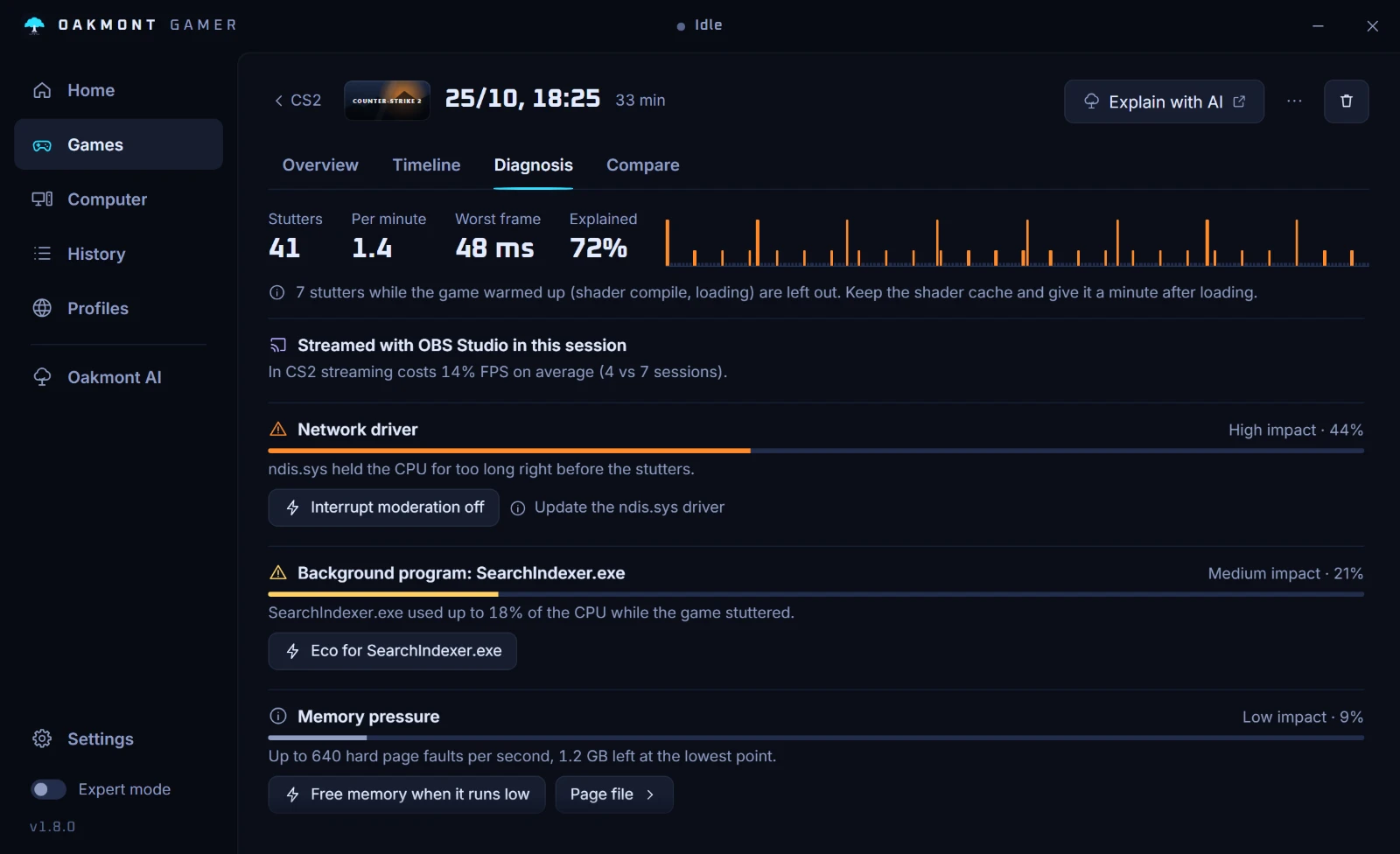
It measures the game while it does this, so a session shows whether a background program or a driver caused the stutter before you write any rule. Every feature works for 5 days, then a one-time licence keeps tuning on.
What happens in one sessionQuestions people ask
- Is Process Lasso a game booster?
- Not in the usual sense. It manages priorities, CPU affinities and power plans for any program, all the time, and Bitsum's home page does not claim higher frame rates. You can use it to boost a game by writing rules for it.
- Does Process Lasso increase FPS?
- It can, where a game is held back by other programs competing for the CPU, and it changes nothing where the game waits on the graphics card. Measure a rule with it on and off before keeping it.
- Is Process Lasso free?
- Bitsum says Process Lasso is free to use. A paid Pro licence unlocks the rest, sold as lifetime, yearly or monthly.
- Can I use Process Lasso and a game booster together?
- Yes, as long as they do not both steer the game. Let Lasso handle your other programs and the booster handle the game, and let only one of them choose the power plan.
- Should I set my game to high priority?
- Only if a test shows it helps. High priority can starve sound and input threads, and Realtime is never a good idea for a game. Apply it per session and compare the 1% lows.