
Three kinds of Rust stutter
- The first minutes on a server. Joining streams in gigabytes of assets. Hitches right after you spawn are loading, and they fade.
- A hitch at a steady interval, like clockwork. That is the engine's garbage collector cleaning up memory.
- Hitches that get worse the longer you play. That is usually RAM running out and Windows reaching for the page file.
Tell them apart before you change anything. Play one session with OakmontGamer running and open its Timeline: the stutters come at a steady rhythm, only after joining, or more and more over time. The Diagnosis tab names the steady ones: Garbage collector hitches.
Memory comes first
Rust wants a lot of RAM. 16 GB is the working minimum and 32 GB is where it plays smoothly. Below that, the fixes are about making room.
- Close the browser and other launchers before you join. They hold the memory Rust is about to ask for.
- Let Windows manage the page file, or give it at least 16 GB if you have less than 32 GB of RAM.
- Keep the page file on an SSD. Rust pages a lot with under 32 GB, and on a hard drive every one of those reads is a freeze.
- Check that the memory runs at its rated speed: XMP or EXPO has to be turned on in the BIOS.
To see whether memory is your problem, open the session's Diagnosis tab after you play. Memory pressure listed as a cause is the answer.
The regular hitch: gc.buffer
Rust runs on Unity, which collects unused memory in short pauses. With a small buffer it collects often, and you feel each pause as a hitch at a steady interval. A bigger buffer means fewer collections.
The setting is gc.buffer, in megabytes. Type it in the F1 console to try it, for example gc.buffer 2048.
- With 16 GB of RAM or more: 2048.
- With 32 GB or more: 4096.
- With less than 16 GB: leave it alone.
The buffer is reserved up front, so on a tight system it takes memory the game needs elsewhere and makes things worse. Raise it only when you have memory to spare while the game runs: a few GB still free at the worst moment. Otherwise free memory first.
Install it on an SSD and keep the cache
Every join loads a lot from disk. On a hard drive that is a long loading screen followed by hitching while the rest streams in. Moving Rust to an SSD shortens both.
One popular tip works against you: clearing the game's cache. The first minutes on a server stream assets even on an SSD, and a cleared cache makes every join slow again.
Settings worth changing
These are the ones with a clear reason behind them. Set them in the options menu or in the console.
| Setting | Value | Why |
|---|---|---|
VSync graphics.vsync | Off | VSync waits for the monitor and adds input lag. |
FPS limit fps.limit | A few FPS under your refresh rate | Keeps frame times even and variable refresh active. |
Motion blur effects.motionblur | Off | Costs FPS and hides detail. |
Depth of field graphics.dof | Off | Costs FPS and hides detail. |
Ambient occlusion effects.ao | Off | Costs GPU time and barely helps you spot anyone. |
The config is cfg\client.cfg in Rust's install folder. Rust writes that file again when it closes, so edit it only while the game is not running, and keep a copy of the old one.
Beyond these, measure before you believe a tip. Lower one setting, play the same area, and compare the 1% lows of the two sessions in OakmontGamer: how to measure them.
When it is not Rust
A driver that holds the CPU, a program busy in the background or a hot GPU cause the same stutter in Rust as in any game. If the hitches follow no rhythm and memory is fine, the checklist for finding a stutter's cause applies here too.
And if players teleport while your frame rate is steady, that is the connection: ping spikes and bufferbloat.
What OakmontGamer does for Rust
Rust has its own in-game preset in the app and its own checks.
- After a session it looks for hitches that repeat at a steady interval and names them: garbage collector hitches, with how often they came.
- It suggests a bigger
gc.bufferonly when the session had at least 4 GB of RAM free at its lowest point. Otherwise it tells you to free memory first. - The In-game settings section writes the values from the table into
client.cfg: the buffer sized to your RAM from 16 GB up, VSync off, an FPS limit 3 under your refresh rate, and motion blur, depth of field and ambient occlusion off. The old file is backed up and can be put back. - The Computer page checks what Rust needs from the PC: the amount of RAM, the size and drive of the page file, and whether the game sits on a hard drive.
- With Rust installed and under 32 GB of RAM it recommends freeing standby memory when RAM runs low, because Rust fills it fast.


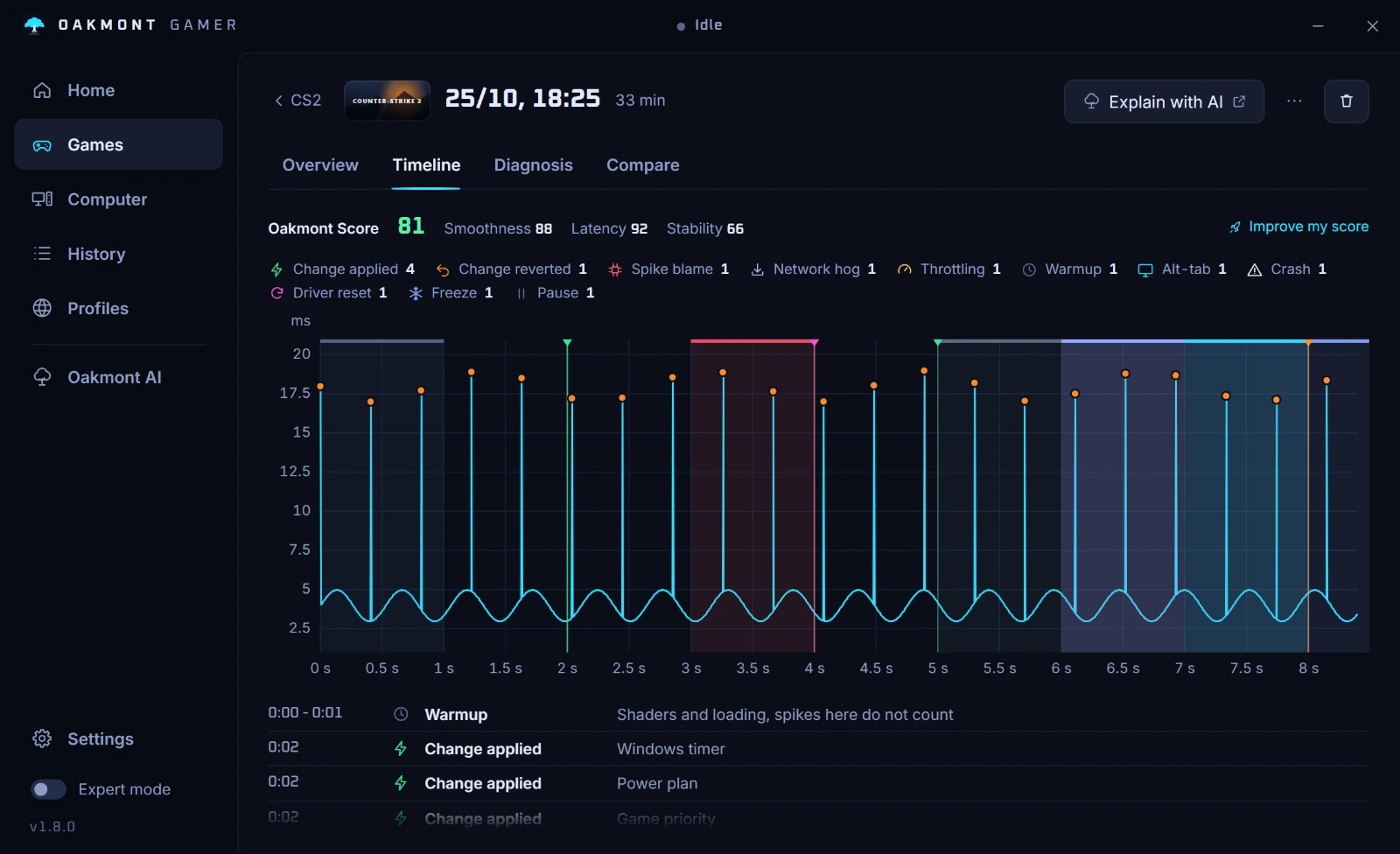
The screenshot is a CS2 session on demo data; a Rust session gets the same pages. The app works from outside the game: nothing is injected into it.
What the app does per game