
Step 1: an SSD, and HDD Mode only as a last resort
Update 2.0 made an SSD a requirement. CD PROJEKT RED advises against a hard drive because its lower bandwidth may stop new content from streaming in properly, and it stopped testing the game on one. On a hard drive, stutter while driving and late pop-in are expected.
HDD Mode is for a game that has to stay on a hard drive. Patch 1.5 made it detect the drive by itself, and when needed it boosts data loading and crowd activity, at the price of less crowd variety, extra loading screens and less detail in the streets when you drive fast. Since patch 2.13 it is in Settings, Utilities. On an SSD it has nothing to fix.
Step 2: Crowd Density and the CPU
CD PROJEKT RED calls the game both graphics and processor intensive. Crowds are among the settings that load the processor, and lowering the resolution does nothing for that part.
- Since Update 2.0 Crowd Density sits in the Graphics tab and changes with the quick presets, but you can set it on its own. If the stutter is in crowded districts, lower it first.
- Hybrid CPU Utilization and AMD SMT sit in Settings, Utilities since 2.13. The SMT switch came with 2.0 and has three choices: Off, On and Auto, which CD PROJEKT RED set up with AMD. Leave both at their defaults unless a measurement says otherwise.
Memory speed matters to a CPU-limited game too. If the RAM runs below its rated speed, XMP and EXPO explains how to check.
Step 3: ray tracing and video memory
Ray tracing and path tracing add a lot of work for the graphics card and fill its memory. CD PROJEKT RED's own table puts the Ray Tracing Overdrive preset at a GeForce RTX 4080 with 16 GB for 4K at 60 FPS, and that figure was measured with frame generation on.
Its frame generation page also recommends turning on upscaling with DLSS on cards with 16 GB of video memory or less at 1440p or higher. When video memory runs out, textures come from system RAM and each one is a hitch. Lower ray tracing a step, or turn on upscaling, before you lower everything else.
For scale: CD PROJEKT RED lists 8 GB of video memory for the ray tracing low preset at 1080p and 12 GB for ray tracing ultra.
Step 4: frame generation and what it needs
Both kinds of frame generation are in the game. DLSS Frame Generation needs a GeForce RTX 40 Series card and Hardware-accelerated GPU scheduling turned on in Windows, which Windows 11 has on by default. AMD FSR 3 with Frame Generation came in patch 2.13.
Frame generation adds frames between real ones. It does not make a stutter go away: a long real frame is still long, and the frames built around it hitch with it. Frame generation and input lag explains when it is worth it, and Hardware-accelerated GPU scheduling what that switch does.
Step 5: measure with the built-in benchmark
Cyberpunk has had a benchmark since patch 1.5. It plays the same scene every time, which makes it the fair way to test a setting.
- Open Settings, Graphics and choose Run Benchmark.
- Run it twice with your current settings. If the two runs differ, that difference is your noise.
- Change one setting, run it again, and compare. Results are saved in
Documents\CD Projekt Red\Cyberpunk 2077\benchmarkResults.
The benchmark gives averages. Stutter lives in the slowest frames, so look at the lows as well: 1% low FPS explains them, and shader compilation stutter explains the kind of hitch that fades on its own. Other big games with their own guides: Elden Ring, GTA V and Helldivers 2.
CD PROJEKT RED's own checklist
- Clean install the graphics driver: Display Driver Uninstaller for NVIDIA, the AMD Cleanup Utility for AMD. If the problem started right after a driver update, go back one version.
- Verify the game files in Steam, GOG or Epic.
- Turn off overlays, for example Discord, Ubisoft Connect and GOG Galaxy.
- Close apps you do not need, hardware monitoring and antivirus tools included.
What OakmontGamer does for Cyberpunk 2077
Cyberpunk is one of the few games where the app tests on a benchmark instead of your play. On the Steam version, with Steam running, it starts the game straight into the built-in benchmark and lets it quit after every run.
- Tuning runs its whole queue of changes on the benchmark by itself, with each change and without it, and keeps what clearly helps.
- Measure on the benchmark on the game's Overview runs gaming mode off and on in turns after a warmup run, so you see what the app gives on your PC.
- Every normal session is recorded too, and Diagnosis names the cause it can see for each stutter, including Video memory full when the card ran out.
- In expert mode, DLSS and FSR files under Fixes puts the newest official DLSS or FSR file into the game and keeps the original. It changes the picture, so the verdict is yours.


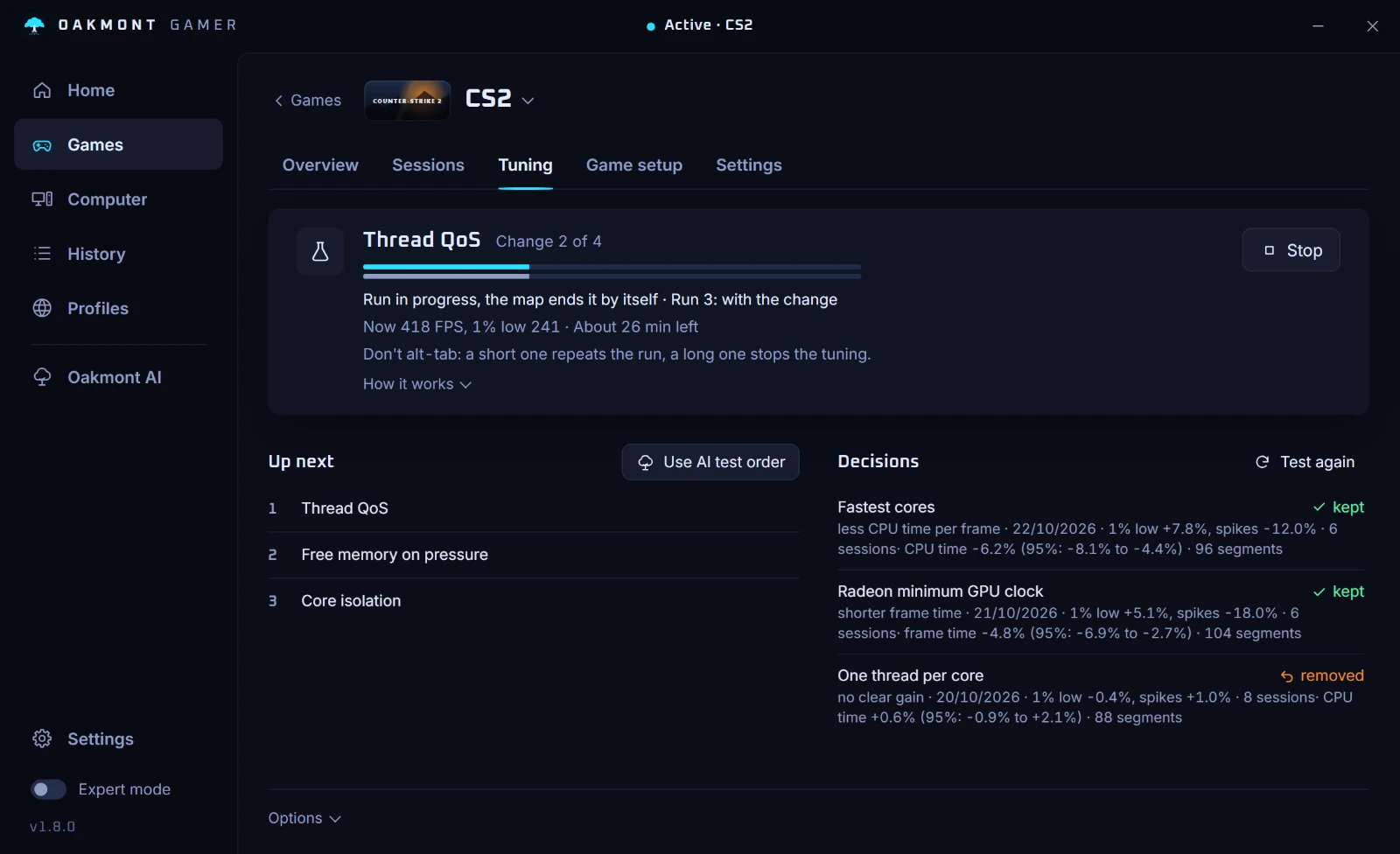
Cyberpunk has no in-game preset in the app, so its settings stay yours. More in how the app tests changes.
How the app tests changesQuestions people ask
- Why does Cyberpunk 2077 stutter on a good PC?
- Usually because of the drive, the CPU in crowded streets or full video memory with ray tracing. Since Update 2.0 the game requires an SSD, and busy districts load the processor no matter the resolution.
- Should I turn on HDD Mode in Cyberpunk?
- Only if the game has to stay on a hard drive. It trades crowd variety, extra loading screens and street detail for steadier loading. On an SSD it has nothing to fix.
- Where is HDD Mode in Cyberpunk 2.x?
- Since patch 2.13 it is in Settings, Utilities, together with Hybrid CPU Utilization and the AMD SMT switch.
- What do I need for DLSS Frame Generation in Cyberpunk?
- CD PROJEKT RED lists a GeForce RTX 40 Series card and Hardware-accelerated GPU scheduling turned on in Windows. Windows 11 has that switch on by default.
- Does Crowd Density affect FPS in Cyberpunk?
- It adds work for the CPU, so it matters most when the processor is the limit. Since Update 2.0 it is in the Graphics tab and follows the presets, but you can set it on its own.
- How do I run the Cyberpunk 2077 benchmark?
- Open Settings, Graphics and choose Run Benchmark. The results go to the benchmarkResults folder under Documents, CD Projekt Red, Cyberpunk 2077.
Sources
The technical claims on this page were checked against these official pages.