
What frame generation does
The GPU renders frames the normal way, and between them it inserts frames it made up from the ones around them. DLSS Frame Generation uses AI to do it; NVIDIA says Multi Frame Generation makes up to five frames per rendered one. FSR Frame Generation and AMD Fluid Motion Frames (AFMF) do the same on AMD's side.
The counter shows the higher number, and motion looks smoother. But the game itself still runs at the rendered rate: it reads your mouse and moves the world only on the real frames.
The four kinds compared
| Built into | Cards | What it needs | |
|---|---|---|---|
| DLSS Frame Generation | The game | GeForce RTX 40 and 50 | Reflex in the game, hardware-accelerated GPU scheduling on, Windows 10 2004 or newer |
| DLSS Multi Frame Generation | The game | GeForce RTX 50 | The same; up to 5 generated frames per rendered one |
| FSR Frame Generation | The game | Any GPU with Shader Model 6.2; the ML version needs Radeon RX 9000 | Game integration; AMD pairs it with Anti-Lag 2 |
| AMD Fluid Motion Frames | The driver | Radeon RX 6000 and newer, Ryzen with Radeon 700M and newer | VSync off in the driver and the game; RX 6000 exclusive fullscreen only |
AFMF works in DirectX 11, 12, Vulkan and OpenGL games without the game supporting it. The in-game kinds get motion vectors and depth from the engine, and DLSS gets the picture without the HUD as well; AFMF in the driver only sees what the game sends to the screen.
Why it adds input lag
To show a generated frame between frame 1 and frame 2, the GPU needs frame 2 already. So frame 2 is rendered, held back, and shown only after the made-up frame. AMD puts it plainly: interpolating a frame adds latency, by design. That is why every vendor pairs frame generation with a latency reducer: DLSS Frame Generation requires Reflex in the game, and AMD recommends Anti-Lag 2 with FSR Frame Generation. Reflex vs Anti-Lag explains what those do.
The lower the rendered frame rate, the longer each held frame is, so the cost grows as the base frame rate falls. NVIDIA's developer guide adds a second trap: with VSync on and a high multiplier on a low refresh monitor, frames are made faster than the screen shows them, they pile up and latency keeps growing. It names 4x as the safe maximum at 60 Hz and 5x at 75 Hz.
The base frame rate the vendors ask for
- AMD, FSR Frame Generation: it runs best from at least 60 FPS before generation (after upscaling). Below 60 is not recommended because the artifacts become more visible, and below 30 should be absolutely avoided.
- NVIDIA, DLSS Frame Generation: NVIDIA's consumer pages give no base number. They promise responsiveness through Reflex, which is mandatory.
- AMD, Fluid Motion Frames: AMD's current AFMF page lists requirements but no base number, so take the FSR figure as the guide.
Upscaling counts toward the base. Turn on DLSS or FSR upscaling first, and add frame generation on top only when the rendered frame rate is already good. Frame generation cannot fix stutter: a long rendered frame is still long, with a made-up frame next to it. Two games that ship it have their own guides: Cyberpunk 2077 and GTA V Enhanced.
Step 1: check the requirements
- DLSS Frame Generation greyed out: check hardware-accelerated GPU scheduling in Settings, System, Display, Graphics, and restart. NVIDIA's guide lists it as required. HAGS on or off has the details.
- AFMF: AMD Software: Adrenalin Edition 25.3.1 or newer, VSync off in both the driver and the game, and a FreeSync monitor recommended.
- FSR Frame Generation: only in games that ship it. AMD also advises turning off Enhanced Sync in AMD Software, which can interfere with its frame pacing.
Step 2: turn it on with a cap and low latency
- Set upscaling first and check the frame rate without frame generation.
- Turn frame generation on in the game, or AFMF in AMD Software, Gaming, Graphics, globally or for one game.
- Keep Reflex or Anti-Lag 2 on. DLSS Frame Generation only works with Reflex in the game, so leave it on.
- Cap the output under the refresh rate. AMD recommends a frame limiter, and VRR with VSync off when frame times vary. G-SYNC and FreeSync settings gives the cap per refresh rate.
- Play a few minutes and judge the feel of the mouse, not the counter.
Why not in competitive shooters
In CS2, Valorant or Apex you aim at what you see, and you want what you see to be as recent as possible. Frame generation shows you an older real frame plus guesses, so the picture moves smoother while the game answers later.
Those games usually run far above 60 FPS anyway, so the smoothness gain is small and the latency cost is real. Save frame generation for single-player games, flight sims and open worlds, where a heavier picture matters more than the last millisecond. Input lag on PC covers the rest of the latency chain. Guides for single shooters: Valorant, Overwatch and Rainbow Six Siege.
What OakmontGamer does about frame generation
The app keeps frame generation away from the games where latency matters and suggests it only where it fits.
- Competitive games, meaning the Competitive preset or a known shooter such as CS2, Valorant, Fortnite or Apex, always get AMD Fluid Motion Frames, Radeon Chill and Enhanced Sync off for the session, even when they are on globally in the driver. They never get a driver frame cap either.
- When the graphics card held a slower game under about 70 FPS for most of a session of ten minutes or more, the session's Diagnosis lists Graphics card at its limit and offers AMD Fluid Motion Frames for that game, or FSR upscaling in the game's settings. Shooters never get this suggestion.
- A game's Fixes tab has Frame generation (experimental): it adds OptiScaler to a single-player game that ships DLSS, FSR or XeSS, after checking the download against its hash. Online games, games with anti-cheat and Microsoft Store installs are refused, and the original files are kept.
- The driver switches go back when the session ends; OptiScaler stays in the game until you take it out on the same tab.


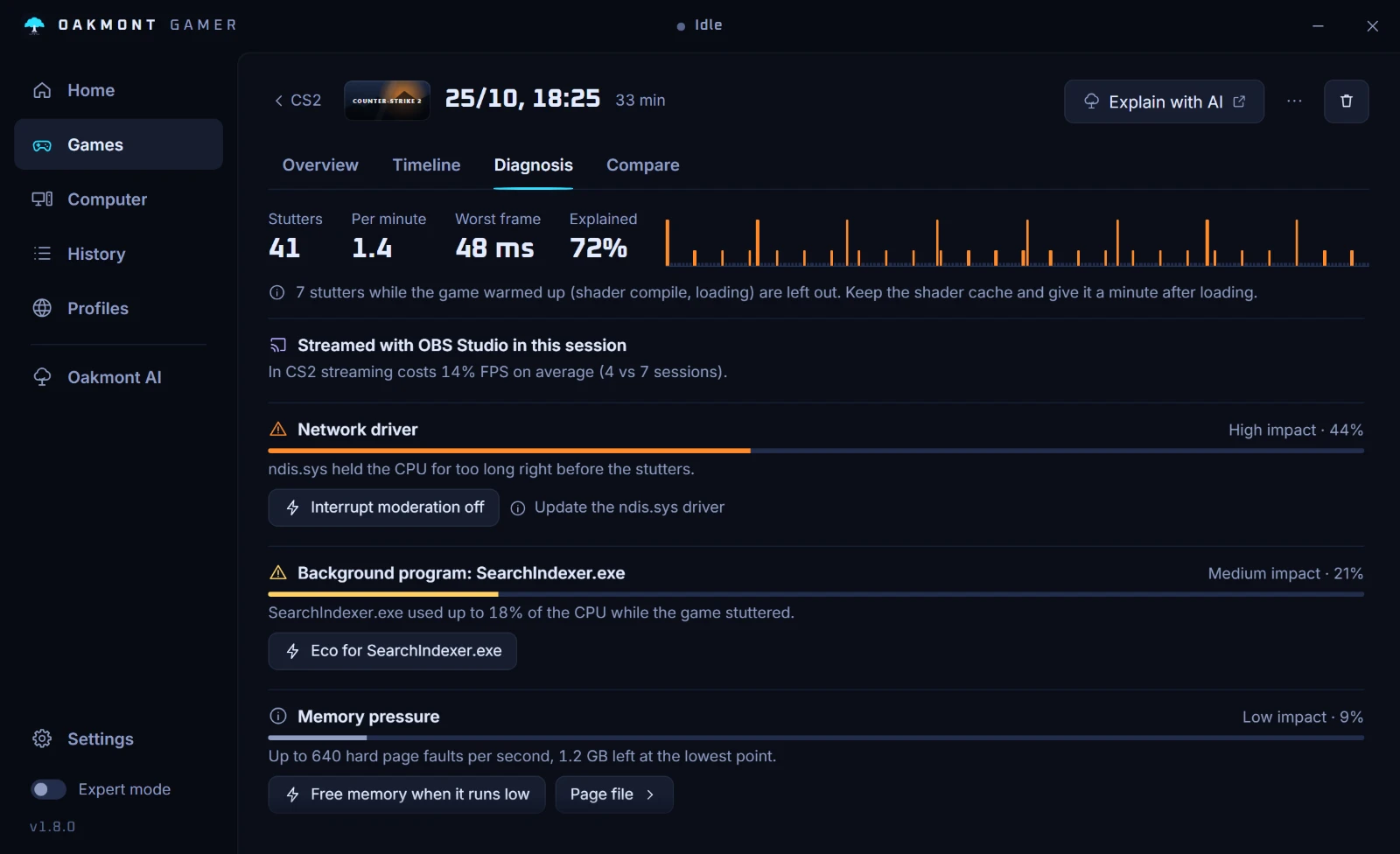
The app does not judge the image. Whether the extra smoothness is worth the softer HUD or the lag is your call, and the Diagnosis only says where the card was the limit.
How the stutter diagnosis worksQuestions people ask
- Does frame generation increase input lag?
- Yes. The newest rendered frame is held back while a generated frame is shown first, and AMD says plainly that interpolation adds latency by design. Reflex or Anti-Lag 2 win part of it back.
- What is the minimum FPS for frame generation?
- AMD recommends at least 60 FPS before generation for FSR Frame Generation and says below 30 should be avoided. NVIDIA gives no number on its consumer pages, but the same logic holds: a low base means more lag and more visible errors.
- Why is DLSS Frame Generation greyed out?
- Most often hardware-accelerated GPU scheduling is off: NVIDIA's guide lists it as required, together with Windows 10 2004 or newer and an RTX 40 or 50 card. Turn it on in Settings, System, Display, Graphics and restart.
- Should I use frame generation in competitive games?
- No. It makes motion smoother while the game reacts later, and these games already run at high frame rates. Keep it for single-player games.
- Is AFMF the same as FSR Frame Generation?
- No. FSR Frame Generation is built into the game and gets motion data from it. AFMF runs in the AMD driver on any DirectX 11, 12, Vulkan or OpenGL game and works only from the finished frames.
- Does Multi Frame Generation add more lag than 2x?
- The held-back frame is the same, but NVIDIA warns that with VSync on, a high multiplier on a low refresh monitor makes frames pile up and latency grow. It names 4x as the safe maximum at 60 Hz.
Sources
The technical claims on this page were checked against these official pages.