
The 60 FPS cap makes every hitch visible
Bandai Namco's spec page for the PC version gives the frame rate as up to 60 FPS, and the game has no setting to raise it. At 60 FPS each frame has 16.7 ms (1000 / 60). A frame that takes 50 ms holds three frames' worth of time on screen at once, and you see it as a jolt.
So the question is not how high the counter goes, it is whether the PC holds 60 in the heaviest places: a big boss, a crowded castle, a storm of spell effects. A PC that only just makes 60 on an open road will drop under it there. The 1% low tells you that better than the average: what 1% low FPS means.
DirectX 12 and shader stutter
Both the spec page and the Steam page list DirectX 12 as the requirement, and Bandai Namco names feature level 12.0. A DirectX 12 game builds its shaders for your exact card and driver while you play and keeps them in a cache on disk. The first time a frame needs a shader that is not built yet, the frame waits for it.
- A new region or boss. The first visit hitches, the second does not. Shadow of the Erdtree's whole map is new ground the first time through.
- After a game patch. Changed shaders are built once.
- After a graphics driver update. The new driver starts from an empty cache.
- After the cache was cleared, by you or by a cleanup tool.
That stutter fades on its own, so do not clear the cache to fix it: that brings it back. Shader compilation stutter explains the cache and when clearing it does help.
Step 1: check that ray tracing is really off
When Shadow of the Erdtree came out, Bandai Namco confirmed a bug in patch 1.12.2: ray tracing switched itself on when save data from an earlier version was loaded. The patch notes from 1.12.3 to 1.16 repeat the warning that in some PC versions ray tracing may be on unintentionally and cause unstable performance.
- From the title screen or the in-game menu, open System, then Graphics.
- Find Ray Tracing Quality.
- Set it to Off unless you turned it on yourself. Bandai Namco says that once it is off, it no longer turns itself on.
Ray tracing came in patch 1.09 with its own requirements: at least a GeForce RTX 3060 Ti or a Radeon RX 6700 XT, at 1080p with low quality and low ray tracing. On a card below that, it is the first thing to turn off.
Step 2: close software that controls the mouse
The same patch notes list a second known cause: in the PC version, an unstable frame rate may be caused by third-party applications that control mouse behaviour, and turning them off may help. Think of mouse companion apps, macro tools and anything that remaps buttons or changes the pointer.
Close them, play the same stretch of the game again and compare. The same goes for any program that keeps the CPU busy in the background: a hitch on a steady rhythm points there, and FPS drops every few seconds has the checklist.
Step 3: update the graphics driver, then give it a session
Bandai Namco's message on PC performance after launch was short: updating your graphics card drivers to the latest version may significantly improve performance. Do that, and restart if the installer asks.
Then expect the next session to stutter more, not less. A new driver builds every shader again, so the first hour after an update is not a fair test. Judge the driver from the second session on. Other big games with their own guides: Cyberpunk 2077, GTA V and Helldivers 2.
Easy Anti-Cheat: leave it alone
Elden Ring runs with Easy Anti-Cheat, and Bandai Namco updates it with the game, as in patch 1.10.1. Its patch notes do not list it among the causes of an unstable frame rate. They do list one anti-cheat problem: the message "Inappropriate activity detected" can appear without cheating, and the fix is to verify the game files in Steam before starting again.
Tools that change the game's files are a bad idea next to an anti-cheat. Helldivers 2 moved to the same anti-cheat in 2026, and its guide covers what that changed there.
If it still stutters: read the pattern
- Hitches in new places that are gone on the way back: shaders. Play on, it fades.
- A hitch every few seconds, wherever you are: a program or a driver. DPC latency explains how a driver does that.
- Drops below 60 in heavy scenes with the GPU fully busy: lower the heavier graphics settings.
- Drops with the GPU not fully busy: the CPU is the limit. Slow memory makes that worse: XMP and EXPO.
What OakmontGamer does for Elden Ring
The app has no Elden Ring preset and no fix of its own for this game: it does not touch the game's files or its settings. What it does is measure every session and tell the stutters that have a cause on your PC from the ones that come from the game.
- Records every frame from outside the game, with nothing injected, and counts the first two minutes and 30 seconds after a load screen apart as warm-up.
- Diagnosis names what lined up with the stutters: a driver call of a millisecond or more, a busy background program, memory pressure, video memory full, a hot GPU, or the game running on integrated graphics.
- A busy background program goes to Eco or is frozen while you play, with one press on its row. Easy Anti-Cheat is never frozen, closed or slowed down.
- File and registry tests in the Fixes tab are refused for games with anti-cheat, so Elden Ring's files stay as they are.


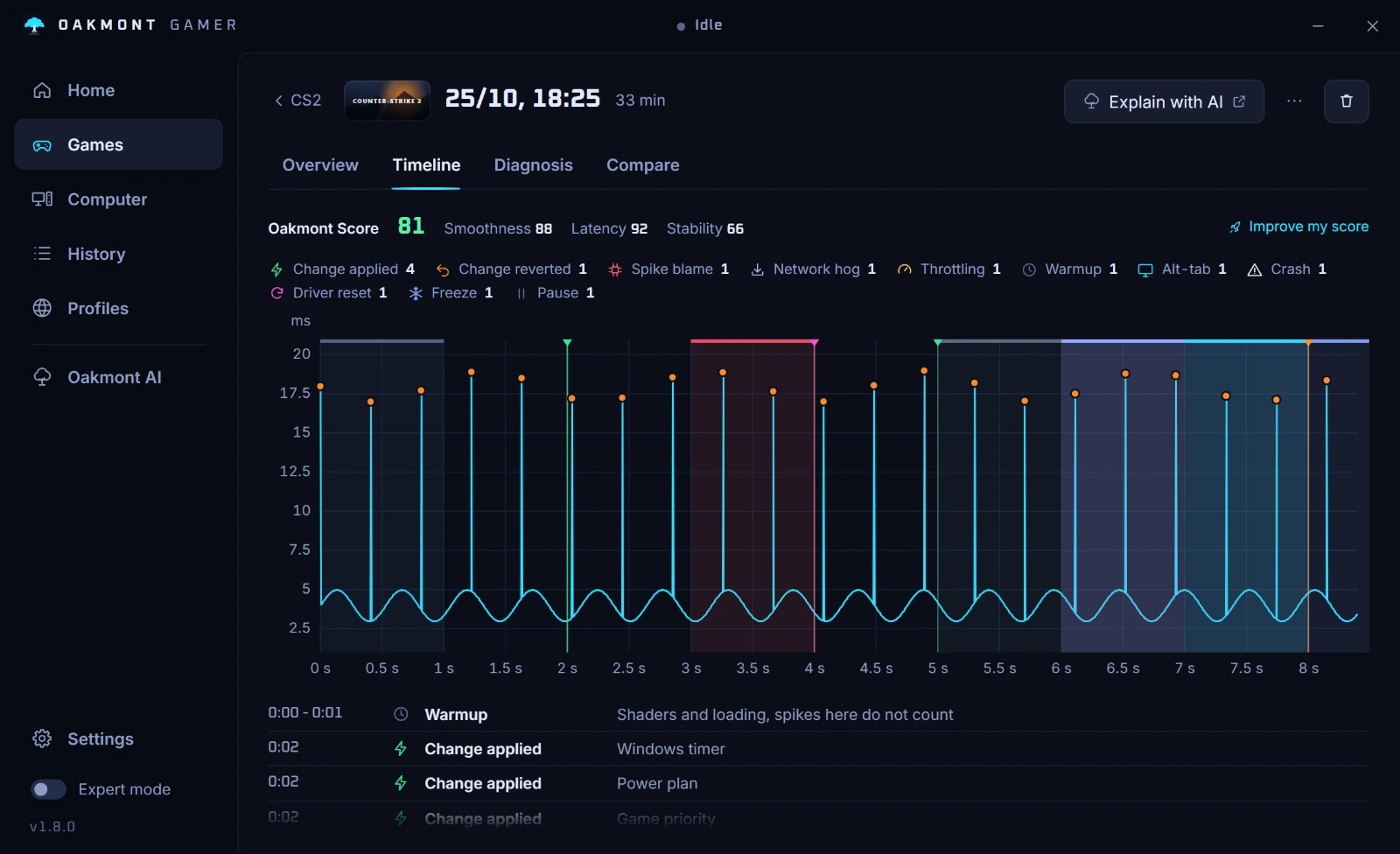
When the stutters line up with nothing on the PC, the app says so instead of inventing a cause. In Elden Ring that usually means shaders or the game itself, and the session report shows which.
How the stutter report worksQuestions people ask
- Why does Elden Ring stutter on a good PC?
- Mostly because it builds DirectX 12 shaders the first time it meets an area or effect, and at a 60 FPS cap a late frame is easy to see. Bandai Namco also names ray tracing switched on by mistake and mouse software as causes of an unstable frame rate.
- Can I remove the 60 FPS cap in Elden Ring?
- Not in the game. The PC version is specified for up to 60 FPS and has no setting to go higher. Anything that unlocks it is a third-party change to the game that Bandai Namco does not document.
- Why does Shadow of the Erdtree stutter more than the base game?
- Its map is new, so shaders are built on the first visit to each place. At its launch a bug also turned ray tracing on by itself for some players, so check Ray Tracing Quality under System, Graphics.
- Should I turn off ray tracing in Elden Ring?
- Yes, unless your card is at least a GeForce RTX 3060 Ti or Radeon RX 6700 XT, the minimum Bandai Namco gives for it. Check that it is really off: a bug used to turn it on by itself.
- Does Easy Anti-Cheat cause stutter in Elden Ring?
- Bandai Namco's patch notes do not list it as a cause. They name ray tracing switched on by mistake and software that controls the mouse. Leave the anti-cheat running and verify the game files if it reports a problem.
Sources
The technical claims on this page were checked against these official pages.
- Bandai Namco: Elden Ring specs and compatibility
- ELDEN RING on Steam: system requirements
- ELDEN RING: a message about some performance issues (Steam, February 2022)
- ELDEN RING patch notes 1.09: ray tracing and its requirements
- ELDEN RING patch notes 1.10.1: Easy Anti-Cheat update
- ELDEN RING patch notes 1.12.2: the ray tracing settings bug
- ELDEN RING patch notes 1.16: possible unstable performance fixes